Google Tasks logoGoogle Tasks
Apple Reminders logoApple Reminders

Google Tasks atau Apple Reminders

Google Tasks vs Apple Reminders: Mana yang Harus Anda Gunakan?

Apple Reminders terintegrasi dalam dengan Siri dan iCloud. Google Tasks bekerja di mana saja Google ada. Bandingkan keduanya dan lihat bagaimana TasksBoard membuat Google Tasks bekerja untuk tim perangkat campuran.

Digunakan oleh 2M+ orang. Gratis untuk memulai.


Google Tasks vs Apple Reminders: Perbandingan Fitur

Fitur
Google Tasks logo Google Tasks
Apple Reminders logo Apple Reminders
Lintas platform (Windows, Android, web) Bantuan Google Tasks
Gmail and Google Calendar integration Google Workspace Tasks
Pengambilan suara Siri Apple Siri + Google Assistant Siri asli
Tampilan papan Kanban TasksBoard + tampilan kolom Apple Melalui TasksBoard Tampilan kolom
Berbagi tim TasksBoard + berbagi Apple Melalui TasksBoard
Pengingat berbasis lokasi Dokumen lokasi Google + Apple
Tugas anak Dokumen sub-tugas Google + Apple
Tugas berulang Google Calendar repeating tasks
Bekerja tanpa perangkat Apple Google Play + App Store
Berbagi awan Google Tasks + berbagi cloud Apple Awan Apple saja

Perbandingan fitur demi fitur

Lihat bagaimana Google Tasks dan Apple Reminders berbeda dalam praktek — dengan screenshot untuk setiap kemampuan dari tabel perbandingan di atas.

Google Tasks 5 Apple Reminders 2 Seri 3

Akses lintas platform

Pemenang: Google Tasks

Google Tasks runs in any browser and has native apps for Android and iOS. Google Workspace also surfaces Tasks inside Gmail, Calendar, Drive, Docs, and Chat on desktop.

Apple Reminders is built for iPhone, iPad, Mac, and Apple Watch. There is no Android or Windows app. Limited browser access exists on iCloud.com, but the full experience is tied to Apple devices.

Google Tasks Pemenang
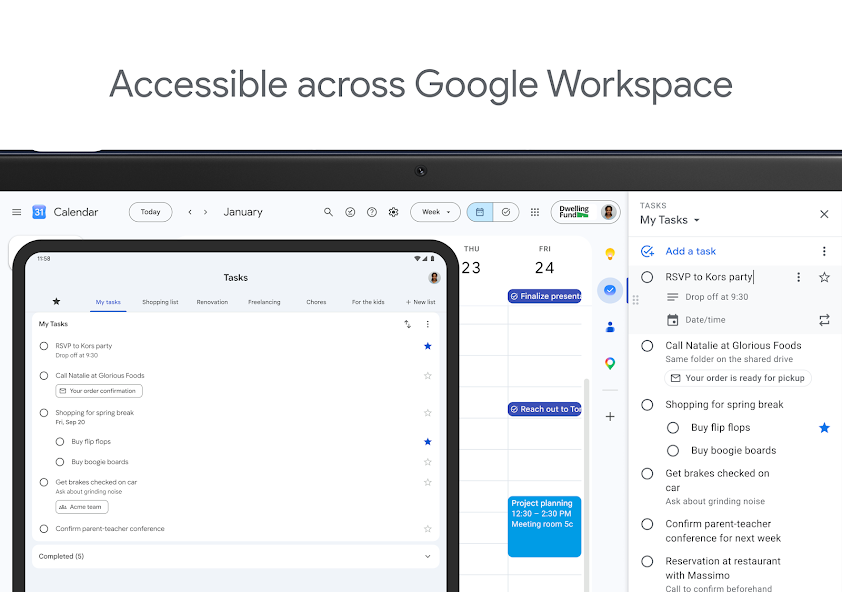
Tangkapan layar resmi Google Tasks menampilkan akses desktop dan tablet di seluruh Google Workspace
Web, Android, iOS, dan desktop, satu akun Google.
Apple Reminders
Tangkapan layar resmi Apple Reminders App Store dari layar beranda iPhone
Aplikasi asli di perangkat Apple; akses web terbatas melalui iCloud.com.

Pemenang: Google Tasks

Google Tasks berjalan di web, Android, iOS, dan di dalam Google Workspace — tidak memerlukan perangkat Apple.
Gmail and Google Calendar integration

Pemenang: Google Tasks

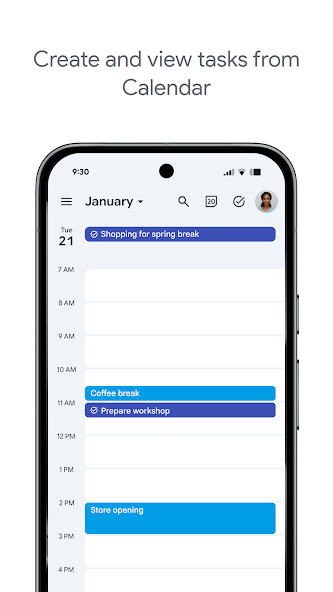
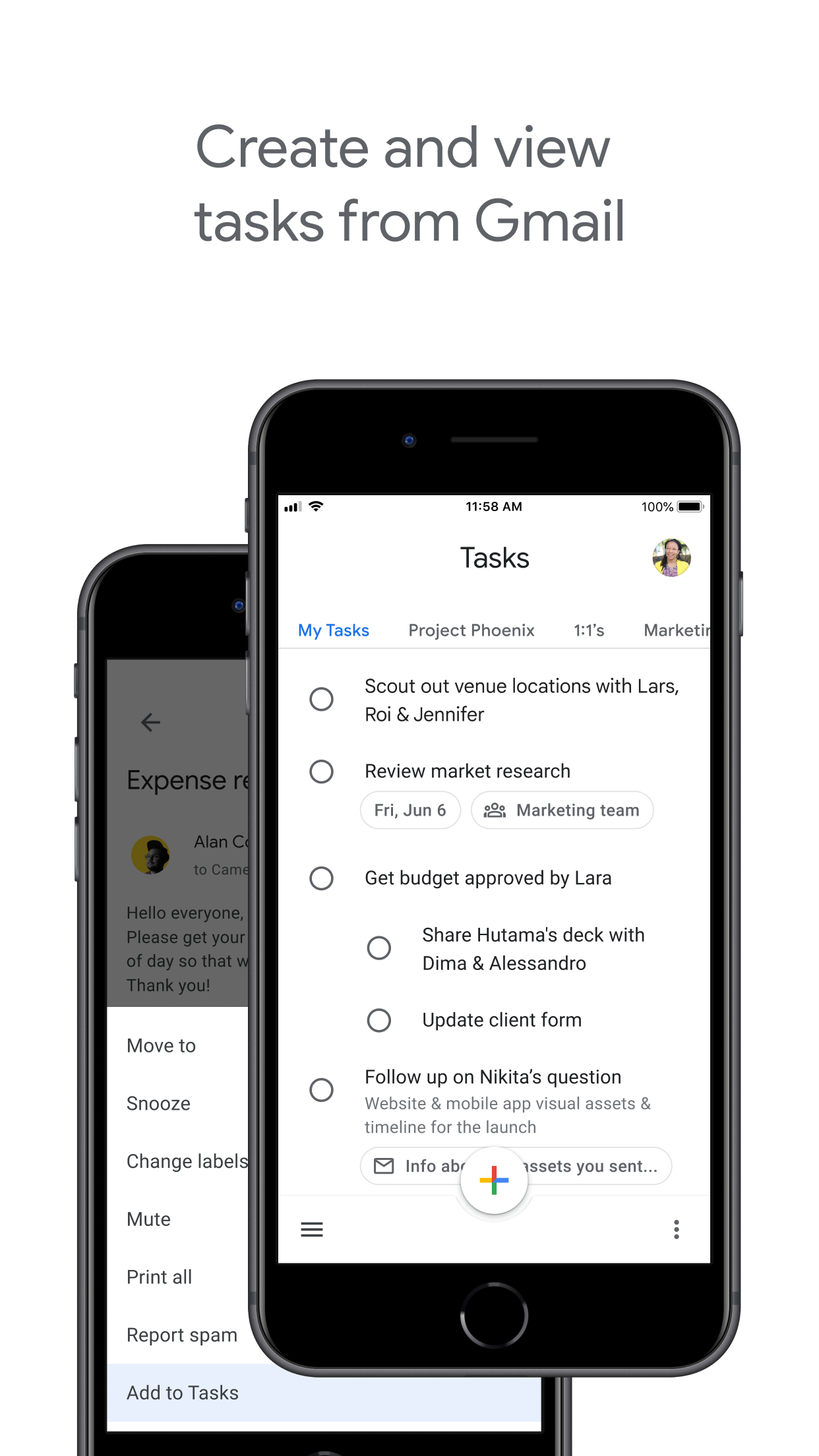
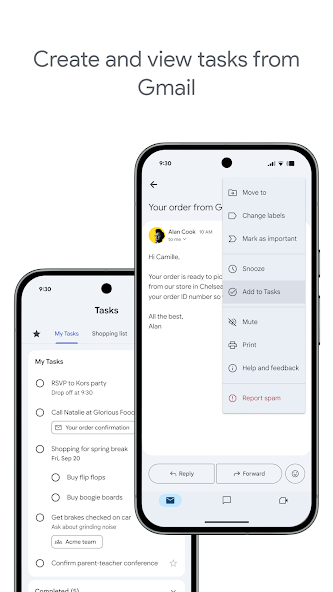
Google Tasks lives inside Gmail, Google Calendar, and Google Workspace. Turn emails into tasks, see due dates on your calendar, and manage work without switching apps.

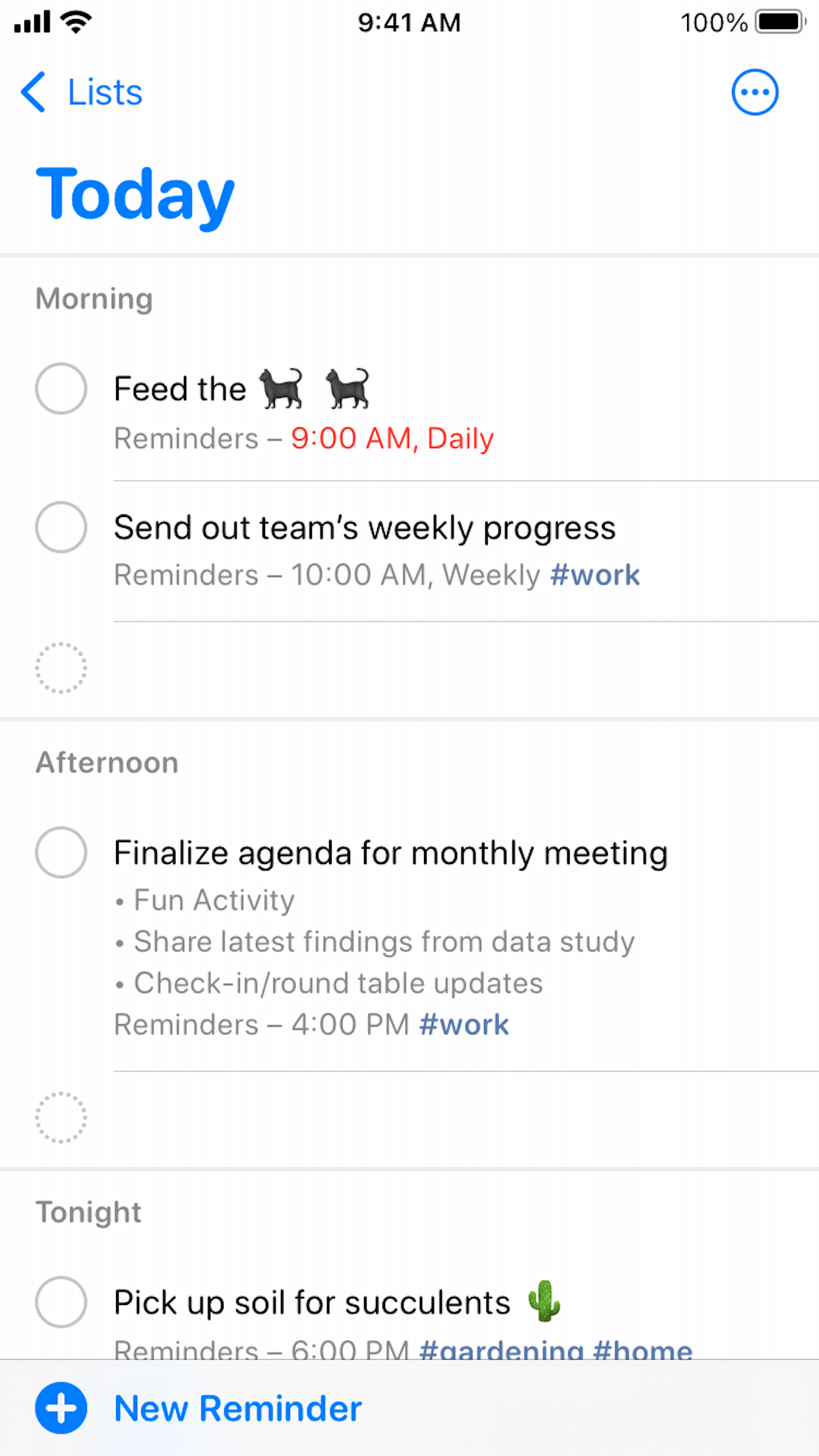
Apple Reminders integrates with Mail and Calendar on Apple devices only. It does not connect to Gmail or Google Calendar, which breaks the workflow for Google Workspace teams.

Google Tasks Pemenang
Tangkapan layar resmi Google Play dari pembuatan tugas dari Gmail
Tugas muncul di bilah samping Gmail dan acara Kalender.
Apple Reminders
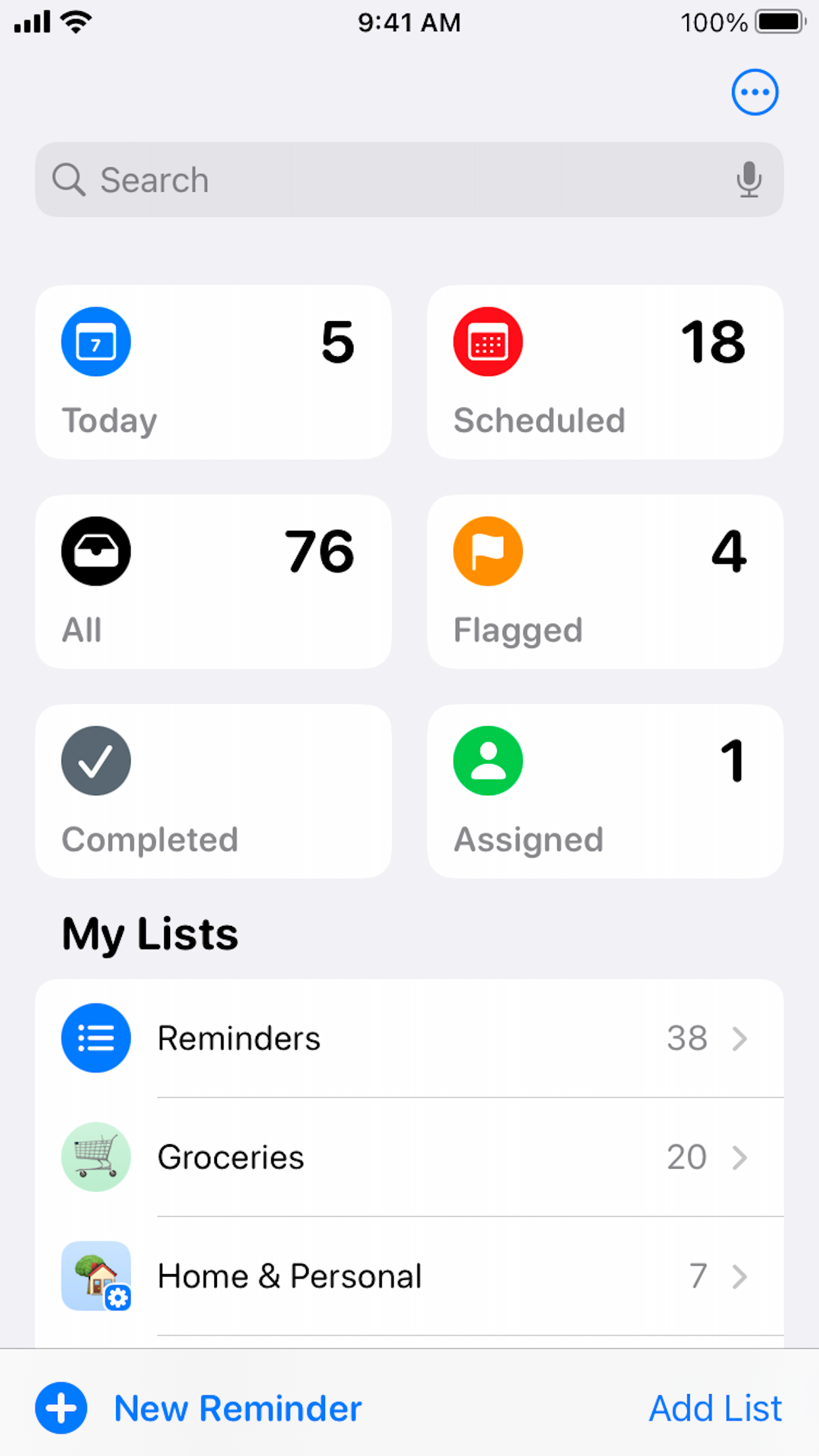
Tangkapan layar resmi Apple Reminders App Store dari daftar pintar Hari Ini
Tidak ada koneksi asli Gmail atau Google Workspace.

Pemenang: Google Tasks

Integrasi Gmail dan Google Calendar asli menjaga alur tugas di dalam ekosistem Google.


Siri dan pengambilan suara

Pemenang: Apple Reminders

Apple Reminders is built for Siri. Say "Hey Siri, remind me to call Alex at 5 PM" and the task appears instantly with time or location triggers.

Google Tasks has no native Siri shortcut. On iPhone you can use the Google Tasks app or Google Assistant, but voice capture is not as seamless as Apple's first-party integration.

Google Tasks
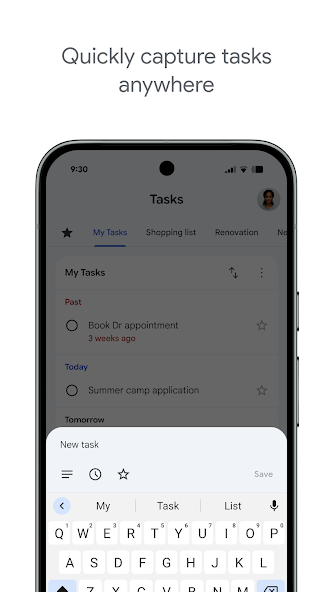
Tangkapan layar resmi Google Play dari penambahan tugas di Android
Ketik di aplikasi atau gunakan Asisten Google di perangkat yang didukung.
Apple Reminders Pemenang
Layar beranda iPhone Apple Reminders dengan mikrofon pencarian Siri
Siri asli: "Hai Siri, ingatkan saya untuk..."

Pemenang: Apple Reminders

Apple Reminders memiliki dukungan Siri pihak pertama — "Hey Siri, ingatkan saya untuk…" bekerja secara instan di perangkat Apple.


Tampilan papan Kanban

Seri

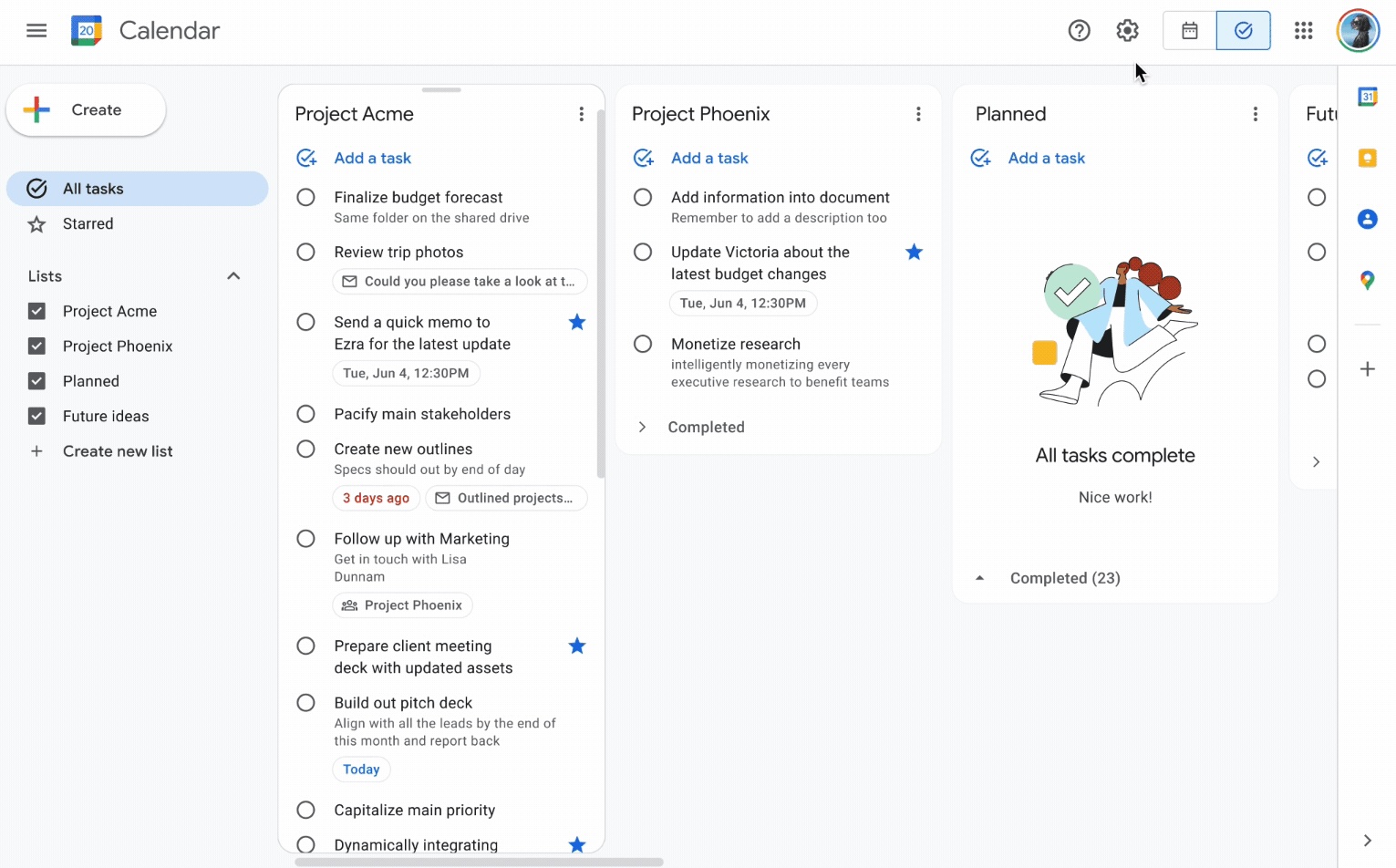
Google Tasks is list-based by default. TasksBoard adds a drag-and-drop kanban board on top of your Google Tasks lists. On the web, tasks.google.com also shows lists as side-by-side columns.

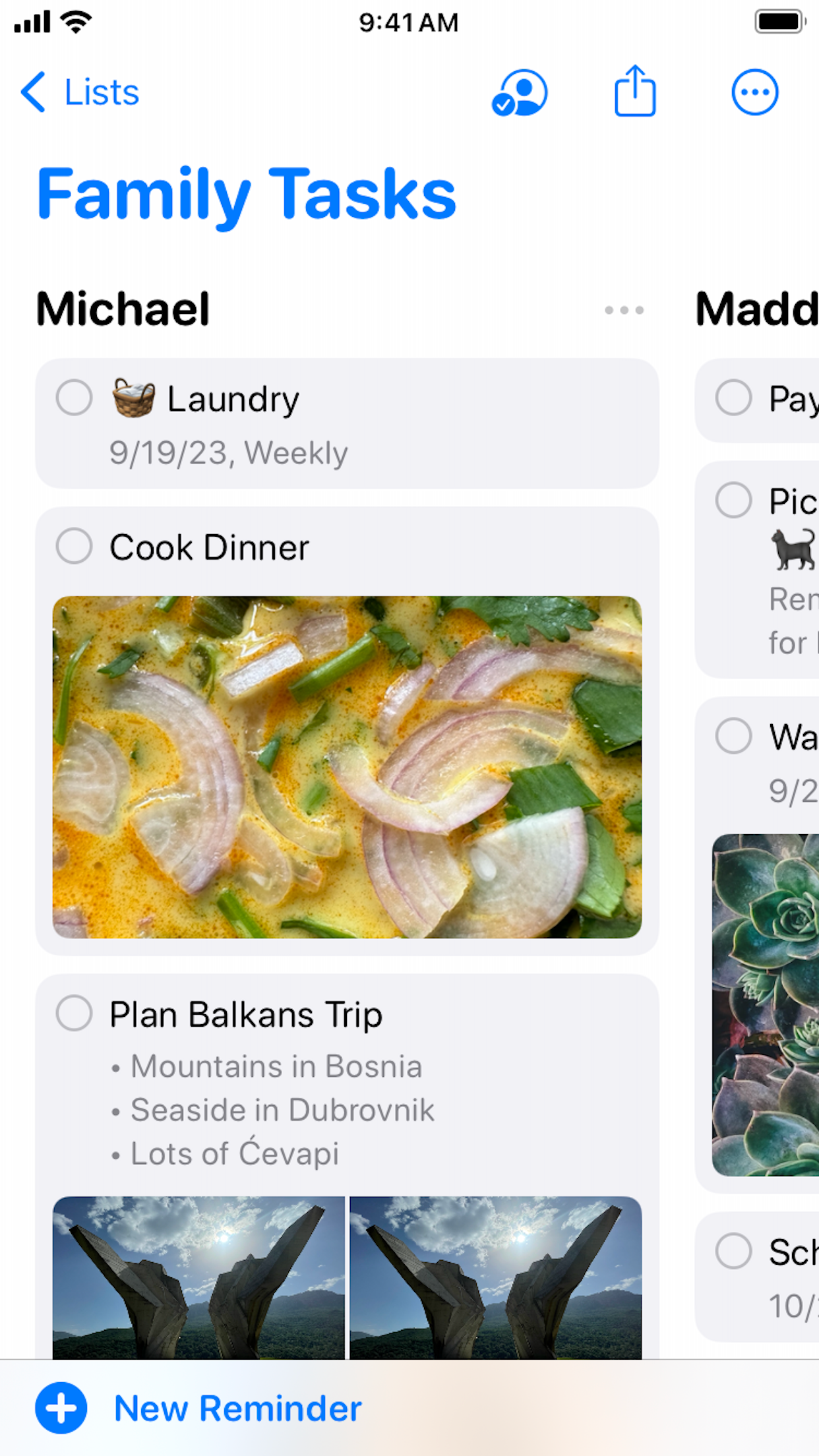
Apple Reminders added a column view in iOS 17 that arranges list sections as kanban-style columns. It is useful for personal and family lists, but is not the same as a shared project board for mixed-platform teams.

Google Tasks
Tampilan papan multi-kolom Google Tasks di web dari 9to5Google
Kolom kanban melalui TasksBoard, disinkronkan dengan Google Tasks.
Apple Reminders
Tampilan kolom resmi Apple Reminders untuk Tugas Keluarga yang dibagikan
Tampilan kolom (iOS 17+) untuk papan berbasis bagian.

Seri

Tampilan kolom Apple Reminders cocok untuk daftar pribadi; TasksBoard kanban cocok untuk papan tim lintas platform. Pilih berdasarkan campuran platform Anda.


Berbagi dan kolaborasi tim

Pemenang: Google Tasks

Native Google Tasks has limited list-sharing. TasksBoard adds real-time board sharing with anyone who has a Google account — on Mac, Windows, Android, or iOS.

Apple Reminders supports iCloud list sharing and collaboration, but every participant needs an Apple Account. There is no native Reminders app for Windows or Android teammates.

Google Tasks Pemenang
Berbagi papan Google Tasks dengan rekan tim melalui TasksBoard
Bagikan dengan akun Google apa pun di platform apa pun.
Apple Reminders
Daftar keluarga Apple Reminders yang dibagikan melalui iCloud
Berbagi iCloud, ID Apple diperlukan untuk semua anggota.

Pemenang: Google Tasks

Berbagi TasksBoard bekerja dengan akun Google apa pun di Windows, Android, dan iOS — tidak hanya ID Apple.


Pengingat berbasis lokasi

Pemenang: Apple Reminders

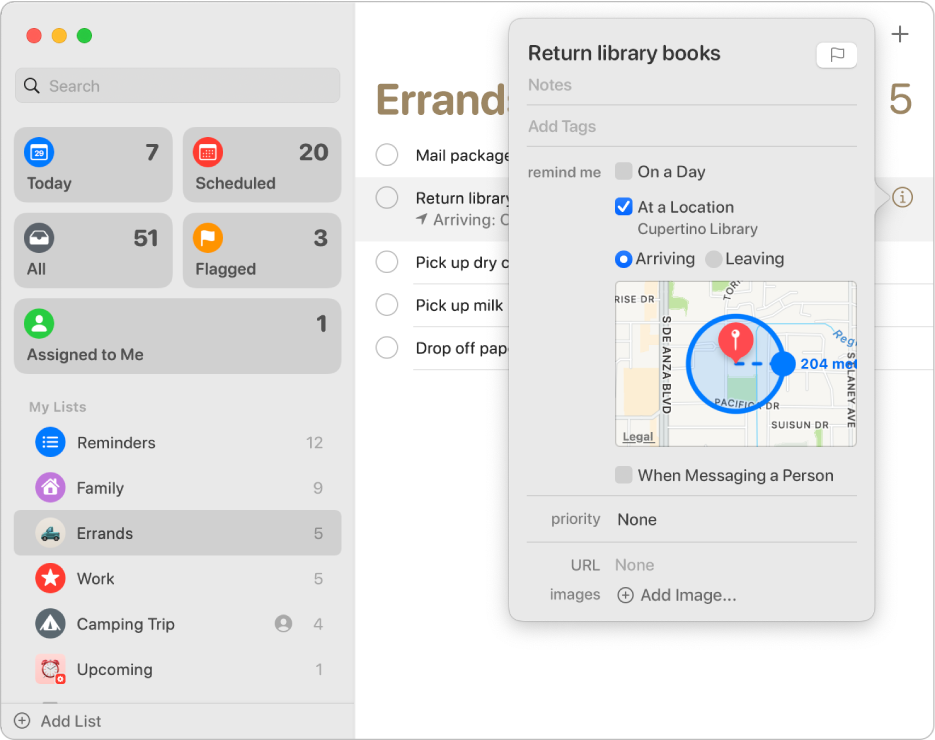
Apple Reminders excels at geo-fenced alerts: "Remind me when I get home" or "When I arrive at the office." Siri and Apple Maps power precise location triggers.

Google Tasks uses time-based due dates synced through Google Calendar. It does not support arrive/leave location triggers natively.

Google Tasks
Google Tasks time-based due date synced to Google Calendar
Pengingat berbasis waktu melalui sinkronisasi Kalender.
Apple Reminders Pemenang
Tangkapan layar dukungan Apple dari pengingat berbasis lokasi dengan radius peta
Pemicu tiba/tinggalkan dengan Apple Maps.

Pemenang: Apple Reminders

Pemicu tiba/tinggal berbasis lokasi adalah kekuatan inti Apple Reminders; Google Tasks hanya mendukung tanggal jatuh tempo berbasis waktu.


Tugas anak

Seri

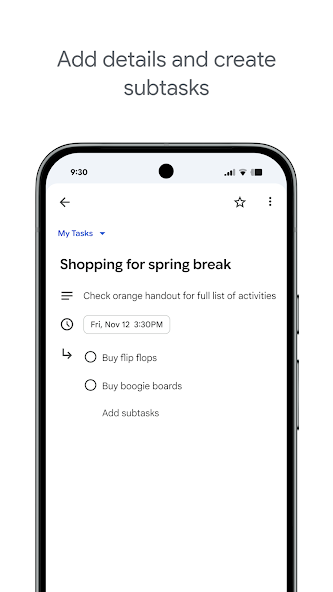
Kedua aplikasi mendukung memecah tugas menjadi langkah-langkah yang lebih kecil. Google Tasks menyematkan subtugas di bawah tugas induk di aplikasi seluler dan web.

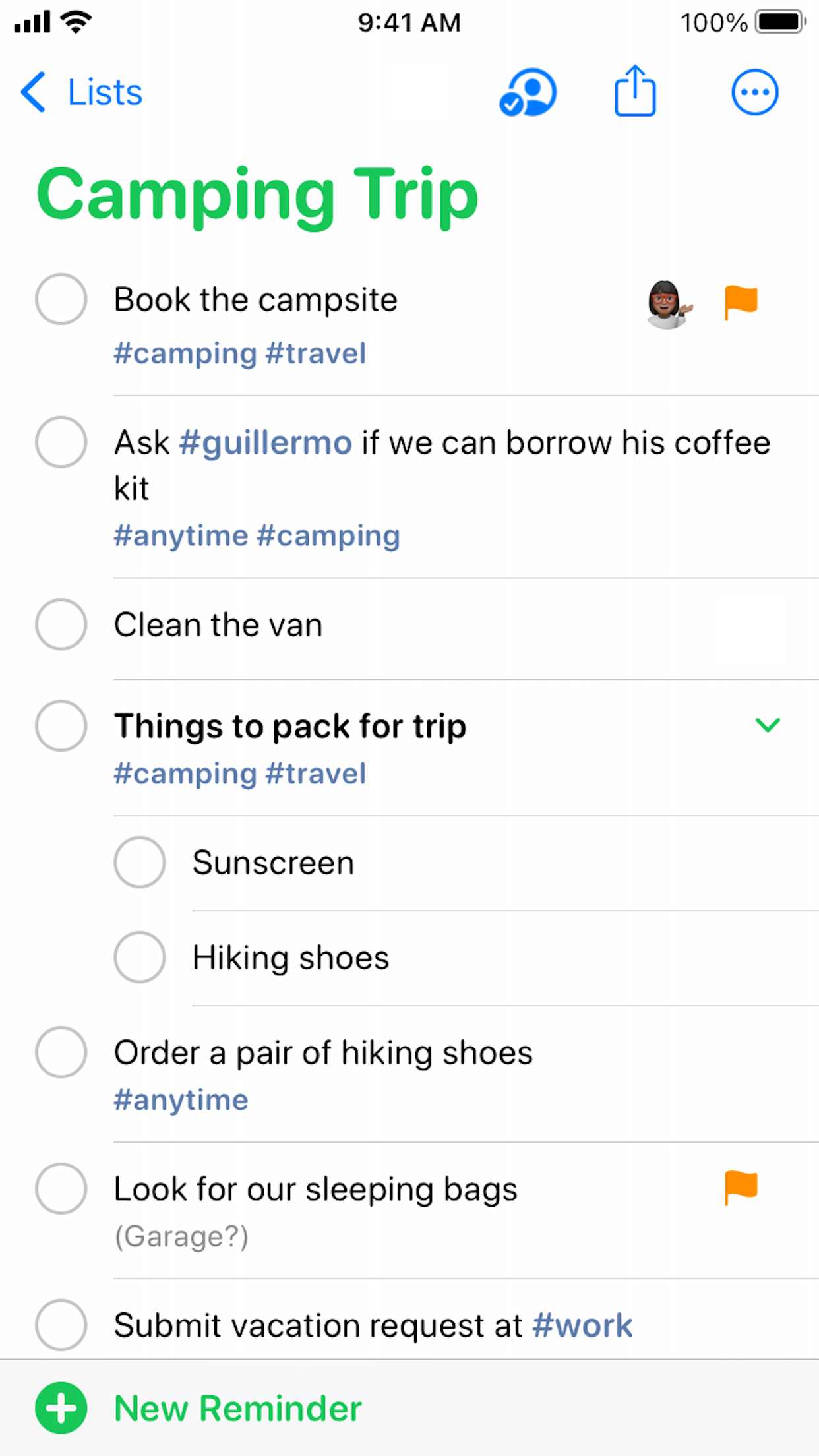
Apple Reminders melakukan hal yang sama dengan subtugas yang diindentasi di bawah pengingat utama. Untuk daftar periksa sederhana, keduanya bekerja dengan baik, perbedaannya adalah ekosistem dan berbagi, bukan dukungan subtugas.

Google Tasks
Tangkapan layar resmi Google Play dari subtugas di Google Tasks
Subtugas yang disematkan di aplikasi Google Tasks.
Apple Reminders
Tangkapan layar resmi Apple Reminders dengan subtugas yang diindentasi di daftar yang dibagikan
Subtugas yang diindentasi di daftar Reminders.

Seri

Kedua aplikasi menyimpan subtask di bawah tugas induk dengan sama baiknya untuk daftar periksa sederhana.


Tugas berulang

Seri

Baik Google Tasks dan Apple Reminders mendukung jadwal berulang — pertemuan harian, tinjauan mingguan, tagihan bulanan.

Jadwal berulang Google Tasks muncul di Google Calendar. Catatan: Google Tasks tidak memungkinkan pengulangan pada tugas yang sudah memiliki sub-tugas. Jadwal berulang Apple Reminders disinkronkan melalui iCloud di seluruh perangkat Apple.

Google Tasks
Tugas berulang Google Tasks dengan jadwal pengulangan mingguan
Tugas berulang yang terlihat di Google Tasks dan Kalender.
Apple Reminders
Pengingat berulang Apple Reminders yang diatur untuk setiap Senin
Jadwal pengulangan disinkronkan melalui iCloud.

Seri

Kedua aplikasi mendukung jadwal berulang. Google Tasks menyinkronkan ulangan ke Kalender; Apple Reminders menyinkronkan melalui iCloud.


Bekerja tanpa perangkat Apple

Pemenang: Google Tasks

Google Tasks is the practical choice for mixed-device teams. Android phones, Windows laptops, and Chromebooks all have full access through apps or the browser.

Apple Reminders has no native Android or Windows app. iCloud.com offers limited web access, but still requires an Apple Account and is not a substitute for teammates on non-Apple platforms.

Google Tasks Pemenang
Google Tasks di ponsel Android
Aplikasi Android lengkap dan akses web.
Apple Reminders
Apple Reminders menampilkan persyaratan perangkat Apple
Tidak ada akses dari Windows atau Android.

Pemenang: Google Tasks

Pengguna Android, Windows, dan Chromebook mendapatkan akses penuh — Apple Reminders tidak memiliki aplikasi asli di platform tersebut.


Berbagi daftar cloud

Pemenang: Google Tasks

Google Tasks lists can be shared in Google Workspace contexts, and TasksBoard extends this with board-level sharing for project teams across platforms.

Apple Reminders supports cloud list sharing via an Apple Account. Collaborators can work on shared lists, but the experience is Apple-first and there is no native app for Windows or Android.

Google Tasks Pemenang
Membagikan daftar Google Tasks dengan pemegang akun Google
Berbagi akun Google, platform apa pun.
Apple Reminders
Daftar Apple Reminders yang dibagikan melalui kolaborasi cloud
Berbagi daftar cloud, Akun Apple diperlukan.

Pemenang: Google Tasks

Berbagi akun Google mencapai rekan tim di semua OS; berbagi awan Apple memerlukan setiap kolaborator untuk menggunakan Akun Apple.


Dicintai oleh ribuan pengguna

4,8 / 5 dari lebih dari 1.000 ulasan di Chrome Web Store

"Always have 101 things to do and this helps me organize and prioritize like no other app can. It syncs to my phone and laptop, and when I add dates to tasks, they automatically integrate into my Google Calendar, which is immensely convenient. I can look at my daily, weekly, and monthly overview in Google Calendar and clearly see how much I was able to accomplish! Great tool indeed. Excited to see how it will evolve over time."

PR Parina Ramjee avatar
Parina Ramjee

"Seriously, makes my tasks easier to share with the team, and the free version is quite nice for our little office. Eventually, we will expand, and this is definitely a great tool to do that! Syncs with my Workspace and Calendar."

CC Chase Cattrall avatar
Chase Cattrall

"I love the simple, intuitive interface and the Add to Tasks feature, especially as I work through my emails! Sharing my tasks is also easy. Overall, outstanding and simple to use, and that means a lot with too many complex tasks out there!"

GC Greg Cantori avatar
Greg Cantori

"Great too for managing daily routine and plan tasks. Would be perfect if it was updated for generating reports for statistics. For google tasks and google calendar"

NV Nick Vlasov avatar
Nick Vlasov

Pertanyaan yang sering diajukan

Apakah Google Tasks lebih baik daripada Apple Reminders?

Google Tasks lebih baik untuk pekerjaan lintas platform, integrasi Gmail, dan kolaborasi tim. Apple Reminders lebih baik untuk pengingat pribadi Siri dan berbasis lokasi di perangkat Apple saja.

Dapatkah saya menyinkronkan Google Tasks dengan Apple Reminders?

No official sync exists. Some third-party apps offer limited bridges, but tasks remain in separate systems. Most users pick one and migrate active items manually.

Apakah Google Tasks bekerja di iPhone?

Ya. Google Tasks memiliki aplikasi iOS asli dan bekerja di Safari. TasksBoard juga berjalan di browser mobile untuk akses papan kanban di iPhone.

Mana yang memiliki pengingat lokasi yang lebih baik?

Apple Reminders has superior location-based reminders tied to Siri and Apple Maps. Google Tasks uses time-based due dates synced through Google Calendar.

Dapatkah Apple Reminders berbagi daftar dengan pengguna non-Apple?

Berbagi Apple Reminders memerlukan akun iCloud dan perangkat Apple. Google Tasks dengan TasksBoard memungkinkan berbagi dengan siapa saja yang memiliki akun Google, di platform apa pun.

Apa itu Google Tasks vs Reminders?

Google Tasks vs Reminders biasanya merujuk pada membandingkan Google Tasks dengan Apple Reminders atau Samsung Reminders. Google Tasks adalah lintas platform; aplikasi Reminders perangkat khusus terikat dengan ekosistem mereka.

Apakah saya harus menggunakan Apple Reminders dan Google Tasks?

Beberapa pengguna menyimpan Apple Reminders untuk pengambilan suara Siri pribadi dan Google Tasks untuk pekerjaan. Untuk proyek tim, konsolidasikan di Google Tasks dengan TasksBoard untuk menghindari sistem terpisah.


Mulai

Tugas lintas platform dengan kanban dan berbagi

Masuk dengan Google dan dapatkan papan kanban layar penuh. Berbagi dengan rekan tim di perangkat apa pun.

Tidak perlu kartu kredit. Bekerja di Mac, Windows, dan mobile.