AI Task Management: How to Work Smarter with AI Tools in 2026

AI Task Management: How to Work Smarter with AI Tools in 2026
Work keeps getting more complex. Tasks arrive through emails, chat apps, meetings, and project tools all at once. Deciding what to tackle first, and making sure nothing falls through the cracks, takes real mental energy. AI task management changes that equation.
Today’s AI tools can sort your tasks by priority, suggest what to work on next, and even generate subtasks from a single sentence. This guide explains how AI task management works, which features matter most, and how to build a smarter workflow using tools you may already have.
What Is AI Task Management?
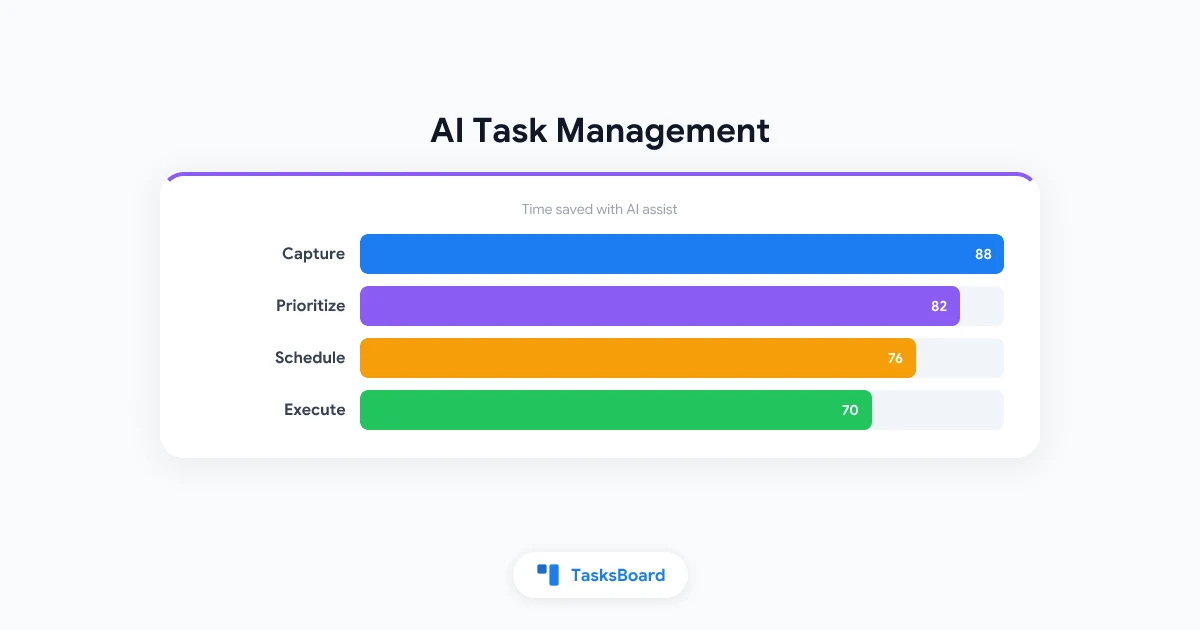
AI task management means using artificial intelligence to help you capture, organize, prioritize, and complete tasks. Traditional task tools simply store your to-do list. AI-powered tools analyze that list and tell you what to focus on.
Modern AI task management can do things like:
- Convert an email into an actionable task automatically
- Suggest a realistic deadline based on your current workload
- Break a vague goal into concrete subtasks
- Surface your most urgent work each morning
- Alert you before a task falls behind schedule
The goal is to reduce the time you spend thinking about your tasks so you can spend more time doing them.
Why AI Task Management Matters More in 2026
Work habits have changed significantly over the past few years. Remote and hybrid teams are the norm. Many people manage tasks across five or more tools at the same time. Without a system that connects those tools, important work gets lost.
AI task management solves this by acting as a smart layer on top of your existing tools. Instead of manually reviewing every email and message for action items, the AI surfaces them for you. Instead of guessing which task matters most, the AI ranks your list based on deadlines, dependencies, and priorities.
Research suggests knowledge workers spend nearly 60% of their time on coordination work rather than their core responsibilities. AI tools chip away at that overhead by automating the routine parts of task management.
Key Features to Look For in an AI Task Management Tool
Not all AI task tools are built the same way. The features below have the most real-world impact:
Natural language input. You should be able to type “Add a design review meeting with Priya on Thursday at 3pm” and have it create the task automatically. No forms to fill out.
Smart prioritization. The AI should understand urgency, deadlines, and team dependencies. It should surface what needs your attention today rather than showing everything at once.
Automated scheduling. The best tools block time on your calendar for your highest-priority tasks. This removes the common gap between planning and doing.
Progress tracking. A shared view of your team’s workload prevents surprises. You should be able to see at a glance who is blocked, what is overdue, and what is ahead of schedule.
Integration with tools you already use. A task tool that requires a completely new workflow rarely sticks. Look for tools that connect with your email, calendar, and communication apps.
How Google Workspace Users Can Add AI to Their Tasks
If your team already runs on Google Workspace, you have a strong foundation. Google Tasks connects natively with Gmail and Google Calendar. That means every task you create stays inside your existing workflow, and every deadline shows up on your calendar automatically.
Here is how to layer AI into a Google Tasks workflow:
- Use Google Gemini in Gmail to identify action items from emails and add them directly to Google Tasks.
- Set due dates on every task. This gives both Google Calendar and AI prioritization tools the context they need to schedule your work.
- Add TasksBoard to get a real-time kanban board on top of your Google Tasks. Your whole team can see, update, and collaborate on tasks without leaving Google Workspace.
- Review your priority list every morning. AI tools work best when you spend five minutes each day confirming the priorities they surface.
This approach keeps everything inside Google, which reduces switching costs and makes sure your AI tools have accurate data to work with. For the full picture on getting the most out of Google Tasks, check out our guide on how to use Google Tasks effectively.
 Try TasksBoard
Turn your Google Tasks into a shared kanban board. Get real-time collaboration, subtasks, and visual project tracking, all synced with your Google account for free.
Get Started →AI Task Management Tools Worth Knowing in 2026
There are now dozens of tools calling themselves AI task managers. The ones below have earned their place by delivering real value, not just AI branding.
Google Tasks + Gemini. For Google Workspace users, this is the natural starting point. Gemini can extract action items from your emails and add them to Google Tasks in one click. It is free for most Workspace accounts.
TasksBoard. Not an AI tool by itself, but the missing visual layer that makes Google Tasks usable for teams. TasksBoard adds kanban boards, subtasks, and real-time collaboration. When your AI tools write tasks to Google Tasks via the API, TasksBoard makes them visible and actionable for the whole team. Read our guide on using Google Tasks as a kanban board to see how the visual layer works.
Notion AI. Notion’s AI assistant can generate project plans, break goals into tasks, and summarize meeting notes. It works well for teams that already use Notion as their primary knowledge base.
Motion. Motion uses AI to schedule your tasks automatically around your meetings. It rebuilds your daily plan every time something changes, which is useful for high-meeting environments.
Reclaim.ai. Reclaim focuses on protecting deep work time. Its AI blocks focus sessions on your calendar and automatically reschedules tasks when meetings run over.
The right tool depends on your workflow. For most Google Workspace teams, combining Google Tasks, Gemini, and TasksBoard covers the core needs without adding a new productivity stack from scratch.
Google Tasks stores your tasks in your Google account. AI tools like Gemini and Motion can read and write to Google Tasks via the API. This means any AI-generated task automatically appears in TasksBoard's kanban view, keeping your whole team aligned without any manual syncing.
Step-by-Step: Build Your AI Task Workflow
Here is a practical setup you can complete in under an hour.
This workflow keeps your tasks in one place, makes them visible to your team, and lets AI tools handle the prioritization work.
Common Pitfalls to Avoid
AI task management tools fail when they are not fed good data. These are the most common mistakes:
Skipping due dates. AI prioritization only works when tasks have deadlines. If half your tasks have no due date, the AI has nothing to rank against.
Using too many tools. Tasks spread across five different apps create more chaos, not less. Pick one place for tasks and commit to it.
Trusting AI blindly. AI tools do not know about your most important relationship or your manager’s urgent call this morning. Always apply human judgment to the final priority list.
Not reviewing weekly. A brief weekly review clears out completed tasks, updates deadlines, and keeps the AI working from accurate information. Pair this with a solid time blocking guide to lock in your most important work.
FAQ: AI Task Management
Conclusion
AI task management is not a future trend. It is available today, works with tools many teams already use, and is free to start. The key is to pick one system, keep your tasks in a single place, and layer in AI tools gradually.
For Google Workspace users, the combination of Google Tasks, Gemini, and TasksBoard covers the core workflow without adding new apps or complexity. Start with a shared kanban board, set due dates on every task, and let AI handle the prioritization work.
The teams that adapt now will have a real advantage. The tools are good enough to make a difference today.
Ready to build a smarter task workflow? Try TasksBoard for free and connect it to your existing Google Tasks in minutes.
Ready to share your Google Tasks?
Get started with TasksBoard for free, no credit card required.
Sign in