Best Workflow Apps in 2026: Tools That Actually Streamline How You Work

The right workflow app does not just organize your tasks. It systematizes how work moves from idea to completion, eliminates the manual coordination overhead that slows teams down, and creates visibility that lets everyone know where things stand without asking.
In 2026, the best workflow apps combine task management, automation, and intelligent routing in ways that would have required a developer to build five years ago. This guide covers what a workflow app actually is, what separates good ones from mediocre ones, and which tools deserve serious consideration for different types of work.
What Is a Workflow App?
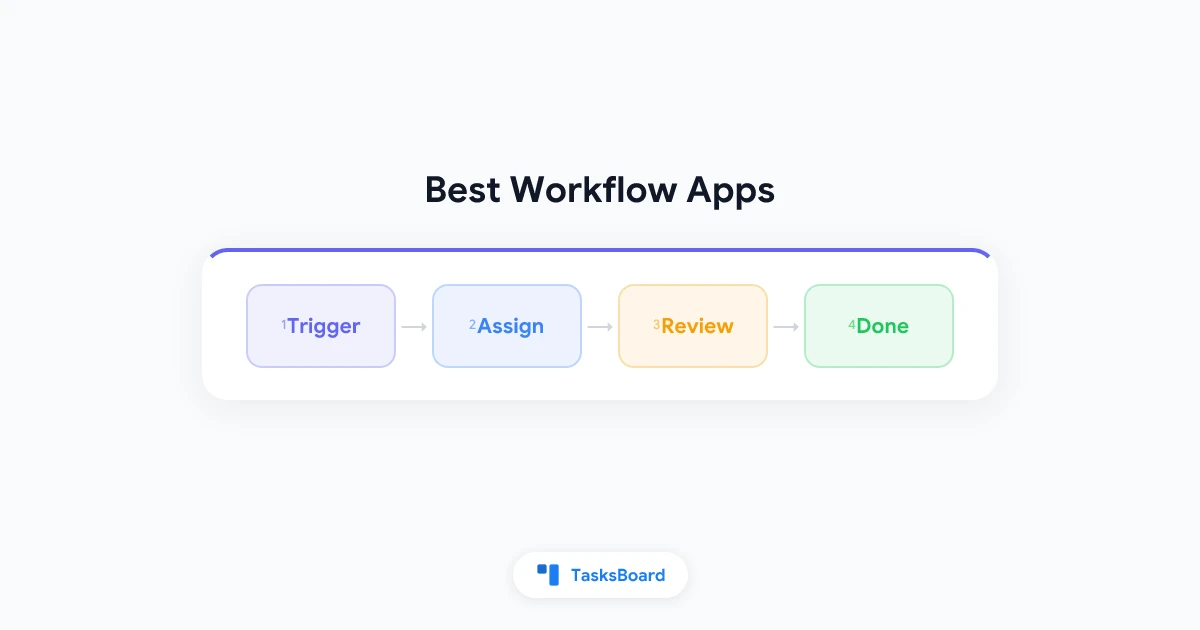
A workflow app is software that helps you define, execute, and track a repeatable sequence of steps. The sequence might be a hiring process (“application received → screening → interview → offer”), a content pipeline (“draft → review → approve → publish”), or a development cycle (“backlog → in progress → review → done”).
The core functions of a workflow app are:
- Process definition: map out the steps in a repeatable process.
- Task routing: move work from one stage to the next, either manually or automatically.
- Status visibility: show where each work item sits in the process at any time.
- Automation: trigger actions (notifications, assignments, status changes) when conditions are met.
Some workflow apps focus on simple visual boards (kanban-style). Others are process automation platforms capable of routing work across multiple systems. The right choice depends on the complexity of your workflows.
Why Workflow Apps Matter More in 2026
Two trends have made workflow apps more important in the past few years.
The shift to distributed work
When teams work across time zones and locations, the informal coordination that happens in an office disappears. Nobody can walk over to a colleague’s desk to check on a task status. Workflow apps provide the shared visibility that replaces passive in-person communication.
AI integration in work processes
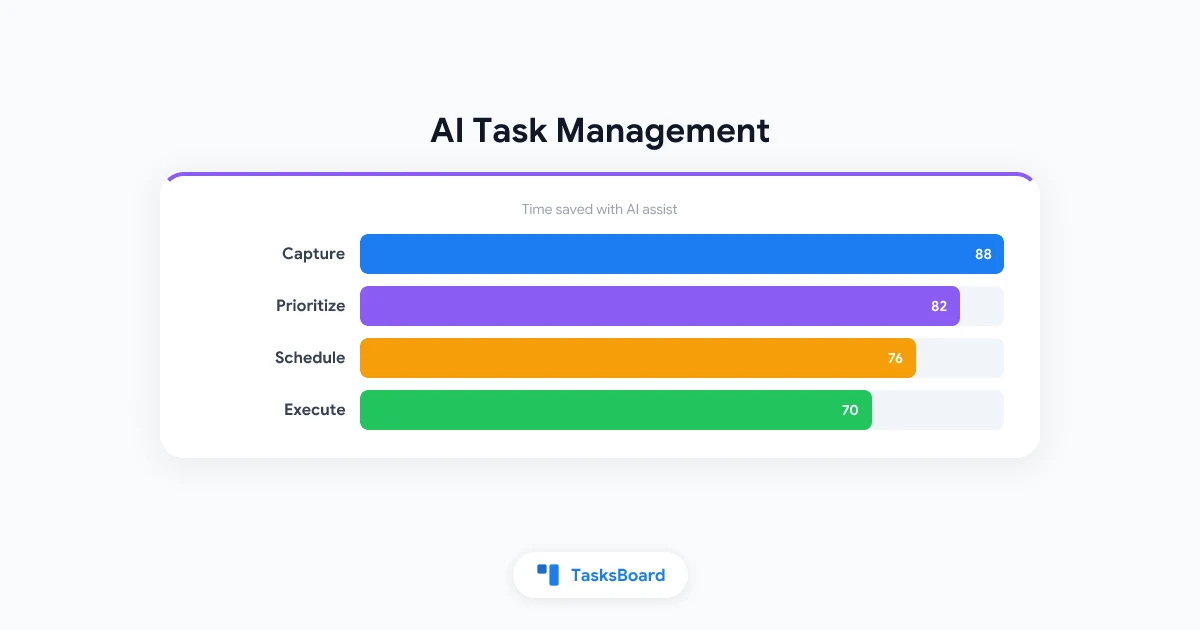
Modern workflow apps increasingly incorporate AI assistance: intelligent task routing, predictive scheduling, automated summaries, and anomaly detection when a process is falling behind. The integration of AI into workflow management is one of the defining future of work trends, and it is shifting the ceiling of what a workflow app can do without human intervention.
Types of Workflow Apps
Not all workflow apps solve the same problem. Understanding the categories helps you select the right type.
Kanban-style task boards
Kanban boards represent work items as cards that move through columns (typically “To Do,” “In Progress,” “Done”). They are the most visually intuitive workflow format and work well for any team doing iterative work.
Examples: TasksBoard, Trello, Linear.
Project management platforms
These tools manage both workflow structure and project planning: timelines, dependencies, resource allocation, and reporting alongside the task board.
Examples: Asana, Monday.com, ClickUp.
Business process automation (BPA) tools
BPA tools focus on automating multi-step processes, often across multiple systems. They route documents, trigger emails, and update records based on conditions, without requiring manual intervention.
Examples: Zapier, Make (formerly Integromat), n8n.
Enterprise workflow management
Enterprise tools handle compliance-heavy, multi-approval workflows with audit trails, role-based access, and integration with ERP systems.
Examples: ServiceNow, Kissflow, Process Street.
Best Workflow Apps in 2026
TasksBoard: Best for Google Workspace Teams
TasksBoard is a kanban-style workflow app built on top of Google Tasks. For teams already in Google Workspace, it is the fastest path to a structured, shared workflow without changing platforms.
You create lists that represent workflow stages, add tasks, and move them through stages as work progresses. Multiple team members can view and edit the board simultaneously, with changes syncing in real time. Because it runs on the official Google Tasks API, your workflow data integrates naturally with Google Calendar and Gmail. When a task has a due date, it shows up in your Google Calendar.
Key strengths:
- Zero migration: your Google Tasks are already there.
- Real-time shared boards with any Google account.
- Native integration with Google Calendar and Gmail.
- Clean, fast interface focused on the board view.
Best for: Google Workspace users, small to mid-size teams, individuals who want a structured workflow without enterprise overhead.
Asana: Best for Cross-Functional Teams
Asana handles complex project workflows with multiple stakeholders and dependencies. Its Timeline view makes multi-step processes with date dependencies easy to visualize. Custom rules (automations) trigger actions when task conditions change. For example, a review task can be automatically assigned when a draft is marked complete.
For teams managing content production, marketing campaigns, or cross-functional launches, Asana provides a clean structure that non-technical team members can adopt without extensive training.
Best for: Marketing teams, operations, cross-functional projects with multiple stakeholders.
Monday.com: Best Visual Workflow Management
Monday.com organizes work in customizable boards with dozens of column types (status, person, date, number, formula, and more). Its automation builder is intuitive and the template library covers a wide range of common workflows.
Monday.com is particularly strong for teams that want to visualize workflows in ways beyond a simple kanban. Automations can trigger email notifications, Slack messages, or updates to other boards when conditions change.
Best for: Teams that want highly visual, customizable boards with strong automation.
Zapier: Best for Cross-App Automation Workflows
Zapier is not a task management tool. It is a workflow automation platform that connects over 6,000 apps. Its core concept is Zaps: trigger + action rules that run automatically. When a new form submission comes in (trigger), create a task in Google Tasks and send a Slack notification (actions).
For knowledge workers, Zapier’s value is in automating the handoff between tools. It is the glue that makes your other workflow apps more powerful without requiring custom development.
Best for: Automating workflows that span multiple apps, eliminating manual data transfer between tools.
Process Street: Best for Structured SOPs
Process Street is designed for teams that run recurring, checklist-driven processes: employee onboarding, client intake, compliance audits, content publishing. You build process templates once and run them as instances when the process needs to happen.
Each run creates a trackable workflow with specific task assignments, conditional logic, and a full audit trail. It is a workflow app designed specifically for process consistency at scale.
Best for: Operations teams, HR, compliance-heavy industries, any team that runs identical processes repeatedly.
Linear: Best for Software Development Workflows
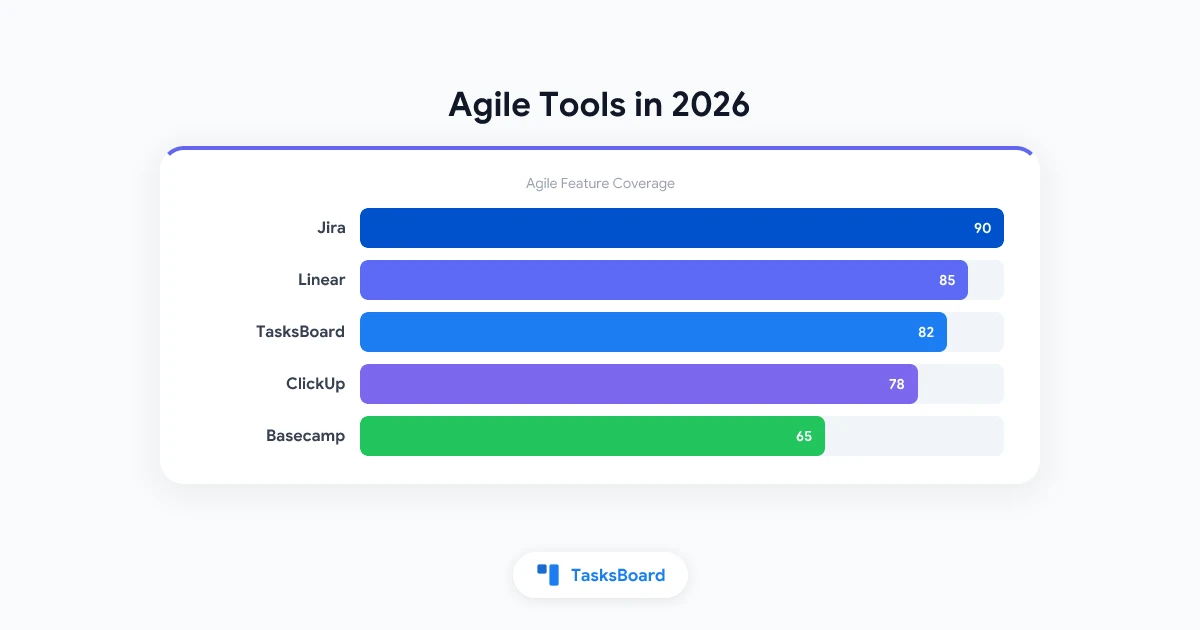
Linear is a project management tool built specifically for software engineering workflows. Its issue tracking, sprint cycles, and triage system are faster and cleaner than alternatives like Jira. If your workflow involves shipping software, Linear’s opinionated structure fits development processes better than general-purpose tools.
Best for: Product and engineering teams building software.
How to Choose the Right Workflow App
Map your actual workflows first
Before evaluating tools, write out two or three of your most important recurring processes as step-by-step sequences. What triggers the process? What are the stages? What are the handoff points? Who is responsible at each step?
This exercise often reveals that your workflow is simpler than you thought and that a basic kanban board covers most of your needs. It also reveals where automation would provide the most value.
Evaluate based on your bottleneck, not feature lists
The best workflow app for your team is the one that solves your specific bottleneck. If your bottleneck is “nobody knows what everyone else is working on,” a shared task board solves it. If your bottleneck is “manual data transfer between CRM and project management tool,” a Zapier integration solves it. A feature-rich platform that addresses your bottleneck is worth more than a comprehensive tool that does not.
Consider your team’s technical comfort level
Powerful workflow automation tools (Make, n8n, enterprise platforms) require meaningful technical investment to configure. If your team does not have someone who can own that configuration, a simpler tool that gets used is better than a powerful tool that gets abandoned.
Start with existing infrastructure
If your team is already in Google Workspace, you have Google Tasks, Google Calendar, and Google Drive. Adding TasksBoard gives you a structured workflow layer on top of that infrastructure. If your team is in Microsoft 365, Microsoft Planner and To Do serve similar functions. Starting with your existing ecosystem reduces the cognitive overhead of learning a new system.
How AI Is Changing Workflow Apps
The integration of AI into workflow apps is accelerating. Current capabilities include:
Intelligent task routing
Some platforms now use AI to suggest which team member should be assigned a task based on current workload, skills, and availability. This reduces the manual overhead of sprint planning and task assignment.
Automated status summaries
AI assistants in tools like ClickUp, Asana, and Monday.com can generate status reports covering what the team completed this week, what is in progress, and what is blocked, without anyone manually writing them. This reduces the overhead of management reporting.
Predictive deadline risk
AI models trained on a team’s historical velocity can flag tasks or projects that are likely to miss their deadlines before the deadline arrives. This allows proactive replanning rather than reactive firefighting.
Natural language task creation
Several workflow apps now let you create tasks, set due dates, and assign them via natural language: “Create a task for Sarah to review the proposal by Friday.” This reduces friction in the task creation workflow.
These capabilities are still maturing, but they represent a genuine shift in what workflow apps can do. The AI task automation space is moving quickly, and the best workflow apps of 2027 will likely handle substantially more of the coordination overhead that currently requires human attention.
Setting Up Your First Workflow
If you are new to workflow apps, start simple:
- Choose one process to systematize first. Your most repetitive, highest-value process is the best starting point.
- Map the stages. Write down the steps from start to finish. Keep it to five to seven stages.
- Create a board with one column per stage. In TasksBoard, these become lists. In Trello or Asana, these become columns.
- Move one real piece of work through the board. See where the workflow feels awkward or where stages are missing.
- Refine before scaling. Get the workflow right for one process before applying the structure to everything.
This incremental approach prevents the common failure mode of designing an elaborate workflow system, spending days configuring it, and abandoning it when it does not match how work actually flows.
Frequently Asked Questions
What is a workflow app used for?
A workflow app is used to define, track, and automate the sequence of steps required to complete a repeatable process. Common uses include managing project tasks, routing documents for approval, automating notifications when work progresses, and providing visibility into where work stands across a team.
What is the difference between a workflow app and a task manager?
A task manager focuses on individual to-do items and their completion. A workflow app focuses on the process: the stages work moves through, the handoffs between people, and the automation of transitions. Many modern tools combine both: TasksBoard, Asana, and ClickUp include task management within a workflow framework.
Do I need a workflow app if I already use Google Tasks?
Google Tasks is a solid individual task manager, but it lacks visual workflow structure and shared board views. TasksBoard adds those capabilities on top of Google Tasks. You get a kanban-style workflow app with the data already in your Google account, no migration required.
What is the best free workflow app?
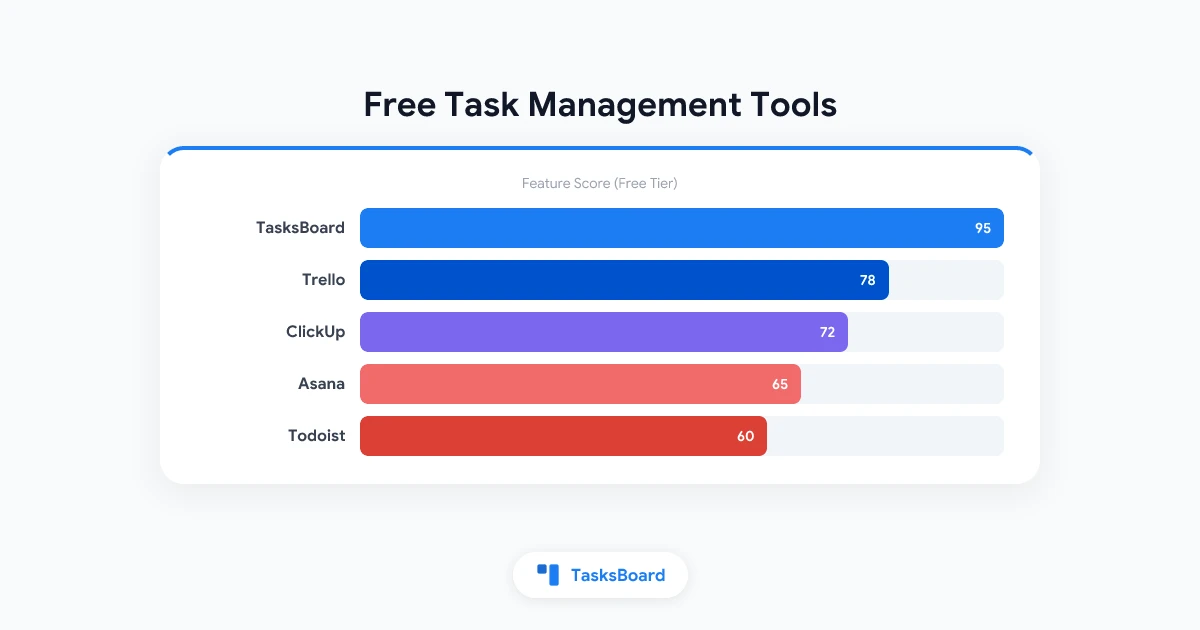
TasksBoard’s free tier covers the core workflow board functionality for Google Tasks users. Trello’s free plan is a solid starting point for simple kanban workflows. For automation-heavy workflows, Zapier’s free plan allows 100 automated tasks per month, which is enough for light use.
How do I automate a workflow without coding?
Most modern workflow apps include no-code automation builders. Zapier and Make connect apps via point-and-click rule creation. Asana, Monday.com, and ClickUp have built-in automation builders for rules within those platforms. For workflows that stay within the Google ecosystem, Google Apps Script provides a coding option, but Zapier-to-Google integrations handle most common automations without code.
What workflow app is best for small teams?
For small teams in Google Workspace, TasksBoard provides the most friction-free setup. For small teams wanting a standalone platform, Asana’s free plan (up to 10 users) or Trello’s free plan cover most small team workflow needs. The best choice depends on whether you prefer to work within an existing ecosystem or adopt a dedicated platform.
The Right Workflow App Makes Work Simpler, Not More Complex
The paradox of workflow apps is that the most powerful tools are often the least useful for teams that have not yet mastered simpler ones. The right workflow app is not the one with the most features. It is the one that maps to how your team actually works and gets used consistently.
Start with the simplest tool that covers your core workflow. Build the habit of tracking work in stages before adding automation. Scale the tool as your process matures.
For most teams in Google Workspace, that starting point is TasksBoard: a shared kanban board on top of Google Tasks, available in minutes with zero migration.
Ready to share your Google Tasks?
Get started with TasksBoard for free, no credit card required.
Sign in