Best Free Task Management Software in 2026: Top Picks Compared

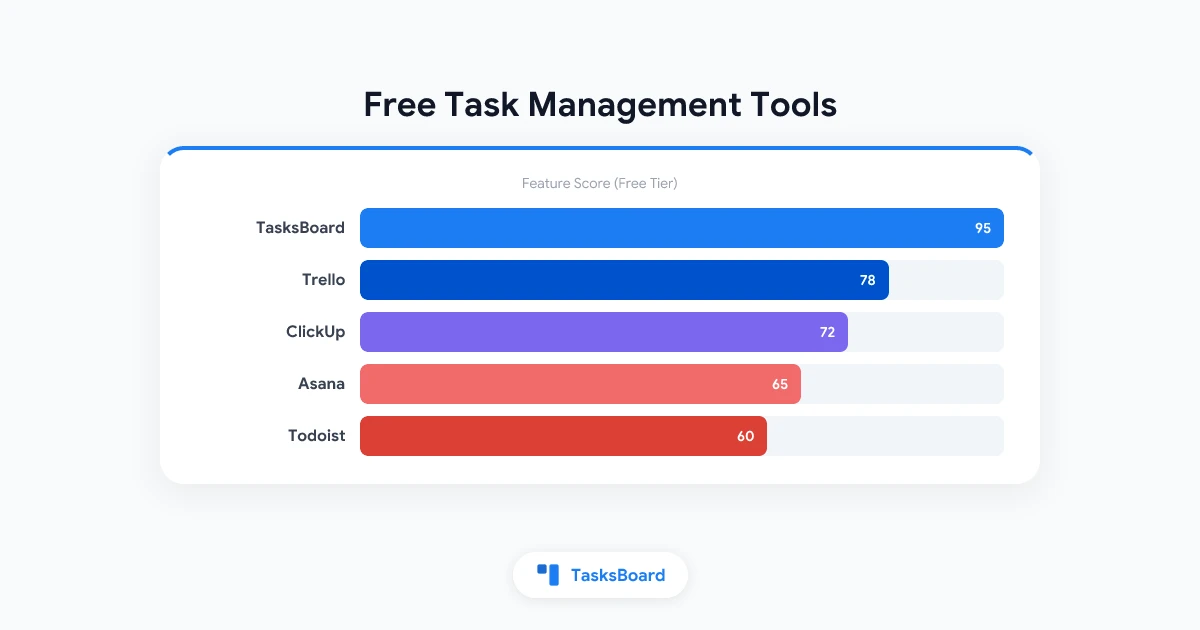
Paying for task management software before you know whether you will use it consistently is a common mistake. The good news is that in 2026, the best free task management tools are genuinely capable. They are not crippled demo versions but full-featured software that meets the needs of most individuals and small teams.
This guide covers the best free task management software available today, what each one actually does well, where each has limits, and how to choose based on your real workflow rather than feature lists.
What Makes Free Task Management Software Worth Using?
Free tools are not created equal. Some are permanently free with generous limits. Others are free tiers designed to push you toward a paid plan as quickly as possible. The distinction matters when you are evaluating options.
The free task management tools worth using in 2026 share a few characteristics:
- Full core functionality for free. The free tier covers creating tasks, setting due dates, assigning work (for teams), and organizing by project or list.
- No artificial limits on basic use. Tools that cap you at five tasks or two users on the free tier are not genuinely free.
- Reliable and maintained. Free tools backed by established companies are less likely to be discontinued or degraded without notice.
- Sufficient integration. Your task manager needs to connect to where your work already lives: email, calendar, or other tools.
With these criteria in mind, here are the best options.
Best Free Task Management Software in 2026
1. TasksBoard + Google Tasks: Best for Google Workspace Users
TasksBoard is a free kanban board built on top of Google Tasks. Google Tasks is completely free as part of any Google account, and TasksBoard adds the visual organization layer that Google Tasks lacks natively.
What you get free:
- Full-screen kanban board view for Google Tasks
- Multiple task lists organized as separate boards
- Shared task lists with team members
- Native Google Calendar integration (tasks with due dates appear on calendar)
- Google Drive integration
Why it stands out: Most free alternatives require you to move your tasks into a new system. TasksBoard builds on infrastructure you already have. If you use Gmail and Google Calendar, your tasks live in the same ecosystem. Nothing to migrate, no new logins to manage.
Limitations: Does not have the automation engine of paid tools like Asana or ClickUp.
2. Todoist: Best Cross-Platform Free Option
Todoist is one of the most polished task managers available, and its free tier is genuinely useful. Available on every major platform (web, iOS, Android, Mac, Windows, browser extensions), it gives you one consistent interface everywhere.
What you get free:
- Up to 5 active projects
- Tasks with due dates, priorities, and labels
- 5 collaborators per project
- Basic productivity karma tracking
Why it stands out: The natural language input is excellent. Typing “Call client Friday at 3pm p1” creates a task with the right date, time, and priority automatically.
Limitations: Subtasks are available on free tier, but filters and reminders require the Pro plan ($4/month).
3. Asana: Best Free Team Tool
Asana’s free tier is among the most generous for teams. Up to 10 team members can collaborate with full access to task creation, assignments, due dates, and project views.
What you get free:
- Unlimited tasks and projects (for up to 10 users)
- List and board views
- Task dependencies on free tier
- Basic reporting
Why it stands out: Most free task management tools limit either the number of users or the number of projects. Asana’s free tier allows unlimited projects and tasks for small teams.
Limitations: Timeline/Gantt view, automation, and advanced reporting require a paid plan.
4. ClickUp: Most Features on Free Tier
ClickUp’s free tier includes an unusual breadth of features, including unlimited tasks, unlimited members, time tracking, and multiple views.
What you get free:
- Unlimited tasks and members
- Docs, Whiteboards, and Sprint management
- 100MB storage
- 5 Spaces
Why it stands out: ClickUp’s free tier is deliberately generous as a growth strategy. The company wants you to build workflows in ClickUp before upgrading. The result is a very capable free tier.
Limitations: Guest accounts, custom fields, and advanced automations are locked behind paid plans. The feature density can be overwhelming for simple use cases.
5. Notion: Best for Docs + Tasks Combined
Notion’s free personal plan lets individuals use the full feature set, including databases that function as task managers. Teams need the Team plan ($8/user/month), but for individuals or small teams, the free tier covers a lot.
What you get free (personal):
- Unlimited pages and blocks
- Kanban, table, calendar, and gallery views
- Basic integrations
Why it stands out: Notion’s flexibility is unmatched. If you want to manage tasks within the same tool where you write documentation, take meeting notes, and store knowledge, Notion is the best option.
Limitations: Real-time collaboration and admin tools require a paid plan. For pure task management, Notion requires more setup than purpose-built tools.
6. Trello: Best Simple Kanban Board
Trello’s free tier provides up to 10 boards per workspace, which is sufficient for many users. The kanban board interface is intuitive and easy to share.
What you get free:
- Up to 10 boards
- Unlimited cards and lists
- Basic Power-Ups (one per board)
- 250 automation commands per month
Why it stands out: Trello has one of the most natural interfaces for visual task management. For teams that just want boards without the overhead of a full project management tool, Trello’s free tier works well.
Limitations: 10-board limit becomes restrictive for teams with many projects. Advanced features require a paid Power-Up.
Free Task Management Software Comparison Table
| Tool | Free Users | Free Projects | Key Free Feature | Paid From |
|---|---|---|---|---|
| TasksBoard + Google Tasks | Unlimited | Unlimited | Kanban board, Google integration | Free / Premium |
| Todoist | 5 per project | 5 projects | Natural language input, 60+ integrations | $4/mo |
| Asana | Up to 10 | Unlimited | Dependencies, list + board views | $10.99/user/mo |
| ClickUp | Unlimited | 5 Spaces | Multiple views, time tracking | $7/user/mo |
| Notion | Unlimited (personal) | Unlimited | Docs + tasks, flexible databases | $8/user/mo |
| Trello | Unlimited | 10 boards | Kanban boards, Power-Ups | $5/user/mo |
How to Choose Free Task Management Software
With several strong free options, the decision comes down to your specific context.
If you use Google Workspace: TasksBoard with Google Tasks. You get the kanban board experience without leaving the Google ecosystem, and your tasks sync with Gmail and Google Calendar automatically.
If you work across multiple devices and platforms: Todoist. Its apps are consistently excellent on every platform, and the free tier handles most individual needs.
If you are managing a small team: Asana. The free tier is the most generous for team use, with up to 10 users and unlimited projects.
If you want to avoid ever upgrading: ClickUp. Its free tier is the most feature-rich, designed to be genuinely useful without requiring a paid plan.
If you want tasks and documentation together: Notion. More setup required, but the combination of docs and databases is uniquely powerful.
If you want the simplest visual boards: Trello. The interface is the most intuitive, and the 10-board limit is sufficient for focused use.
Free vs. Paid: When Should You Upgrade?
Free task management software is sufficient for most individuals and small teams. Consider upgrading when:
- You have more than 10 users: most free tiers have user limits or become impractical at scale.
- You need automation: recurring tasks, status-change triggers, and integrations typically require paid plans.
- You need reporting: workload views, velocity tracking, and portfolio dashboards are mostly behind paid tiers.
- You need advanced integrations: connecting your task manager to Slack, Salesforce, or other business systems usually requires a paid integration.
- You need priority support: free tiers typically offer community support only.
For many teams, the free tier of their chosen tool remains sufficient for years. Do not upgrade preemptively. Upgrade when you actually hit the limit.
AI Features in Free Task Management Software
In 2026, AI features are increasingly appearing in task management tools, though most are behind paid tiers.
ClickUp AI is available on paid plans and offers task summarization, writing assistance, and smart scheduling.
Notion AI is an add-on at $10/user/month and provides text generation, summarization, and data extraction from documents.
Asana AI is included on higher-paid tiers and offers intelligent project status summaries and risk identification.
For the free tier, AI features are mostly not available. The core task management capabilities (creating, organizing, and tracking tasks) remain fully functional without AI.
FAQ
Is there truly free task management software, or is everything freemium?
Most tools use a freemium model: a free tier with genuine value, plus paid plans for advanced features. Google Tasks (with TasksBoard) is the closest to genuinely free. Google Tasks has no paid tier, and TasksBoard’s free tier is comprehensive.
What is the best free task management app for individuals?
Google Tasks with TasksBoard for Google users, Todoist for cross-platform users. Both offer full core functionality at no cost.
What is the best free team task management tool?
Asana for teams up to 10 people. ClickUp for teams that want more features and do not mind more complexity. TasksBoard for Google Workspace teams.
Can I manage projects for free in 2026?
Yes. Asana, ClickUp, and Notion all offer project management capabilities on free tiers. The limits are around team size, automation, and reporting rather than core project creation.
Is Google Tasks a good free task management option?
Google Tasks is excellent for simple task lists, especially if you use Gmail and Google Calendar. For visual organization and team collaboration, add TasksBoard as a free interface layer on top.
When does free task management software stop being sufficient?
The typical trigger points are: needing automation (recurring tasks, triggers), needing reporting (who is doing what, velocity), needing more than 10 users, or needing enterprise features like SSO and audit logs.
Get Started with Free Task Management
The best free task management software is not the one with the longest feature list. It is the one that fits how you and your team actually work.
If you use Google Workspace, start with TasksBoard. Create a few task lists, add your current work, share them with your team, and use the kanban board to track progress. It takes minutes to set up and costs nothing.
If your needs evolve, every tool on this list has a paid tier you can grow into. But for most teams, the free tier is where you will stay.
Ready to share your Google Tasks?
Get started with TasksBoard for free, no credit card required.
Sign in