Best Agile Tools in 2026: Free and Open Source Options Compared

Agile is not a tool. It is a set of values and practices. But the right tools make those practices dramatically easier to sustain. A team running sprints without a shared backlog view is a team whose process is working against them.
In 2026, agile tooling has matured significantly. There are excellent options for every team size, budget, and technical sophistication.
What Agile Tools Actually Need to Do
Not all project management tools are agile tools. The right agile tool must support the specific practices that make agile work, not just offer a kanban board with a sprint label attached.
- Backlog management: shared, prioritized list of user stories and tasks, visible in real time
- Sprint planning: ability to create time-boxed sprints and pull items from the backlog
- Board visibility: kanban or scrum board showing in-progress, blocked, and done states
- Velocity tracking: measure how much work the team completes per sprint
- Code integration: for engineering teams, connection to GitHub or GitLab so commits close issues
Best Agile Tools in 2026
Jira: Industry Standard for Engineering Teams
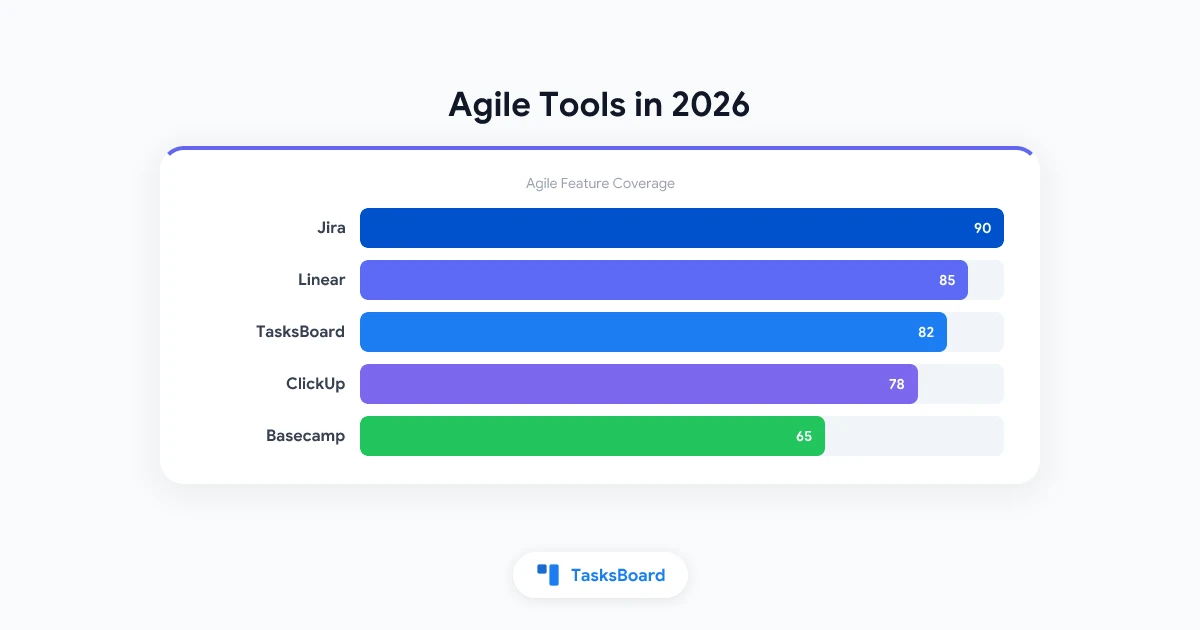
Jira is the most widely used agile tool in software engineering. It is purpose-built for scrum and kanban workflows with deep feature coverage: story points, epics, sprints, burndown charts, velocity reports, and roadmaps.
Strengths:
- Comprehensive scrum and kanban support
- Advanced reporting (burndown, velocity, cumulative flow)
- Deep GitHub/Bitbucket integration
- Highly customizable workflows
Weaknesses:
- Complex configuration for new teams
- Free tier limited to 10 users
- Interface complexity grows with project complexity
Price: Free for up to 10 users. $7.75/user/month for Standard.
Best for: Engineering teams running formal Scrum or Kanban who need full agile tooling and reporting.
Linear: Best for Modern Engineering Teams
Linear has rapidly become the preferred agile tool for product engineering teams at fast-moving companies. It is fast, opinionated, and beautifully designed, a deliberate contrast to Jira’s complexity.
Strengths:
- Extremely fast interface with excellent keyboard navigation
- Cycles (sprints) with automatic issue management
- Native GitHub integration (auto-close issues on merge)
- Clean UI that does not require configuration
Weaknesses:
- Less customizable than Jira
- Limited to 250 issues on free tier
- Not ideal for non-engineering use cases
Price: Free for up to 250 issues. $8/user/month for Standard.
Best for: Product engineering teams that want agile structure without Jira’s overhead.
Asana: Best for Cross-Functional Agile Teams
Asana is not a traditional scrum tool, but it works well for agile teams that include non-engineering members who need to participate in sprint-based planning without adopting Jira’s vocabulary.
Strengths:
- Multiple views (list, board, timeline, calendar) for the same project
- Rules-based automation on Business plans
- Portfolio view across multiple projects
Weaknesses:
- No native sprint concept
- No burndown or velocity charts
- More expensive at paid tier than alternatives
Price: Free for up to 10 users. $10.99/user/month for Premium.
Best for: Cross-functional agile teams where not everyone comes from a software background.
TasksBoard: Best for Google Workspace Agile Teams
TasksBoard is a kanban board built on Google Tasks. For agile teams that use Google Workspace, it provides a shared board view without requiring a separate tool ecosystem.
Run kanban boards on top of Google Tasks, with real-time sharing, drag-and-drop, and Google Calendar integration. Free for most teams.
Sign in →Strengths:
- Kanban board with full drag-and-drop support
- Shared task lists via Google accounts
- Native Google Calendar integration for deadline tracking
- Free for most use cases
Weaknesses:
- No native sprint functionality
- No burndown or velocity charts
- Best suited for kanban rather than Scrum
Price: Free / Premium.
Best for: Agile teams using Google Workspace who want kanban without leaving their existing tool stack. See also: Sprint Planning Guide for how to structure sprints with lightweight tools.
Trello: Best Simple Kanban Tool
Trello’s kanban board is one of the most intuitive in the market. For teams that practice kanban (continuous flow, not time-boxed sprints), the simple card-and-column model works well.
Strengths:
- Extremely low learning curve
- Butler automation included on free tier
- Wide template library for common agile workflows
Weaknesses:
- No sprint management
- Limited reporting
- Free tier caps at 10 boards
Price: Free (10 boards). $5/user/month for Standard.
Best for: Teams practicing kanban (not Scrum) who want simplicity over comprehensiveness.
GitLab Issues: Best for GitLab Teams
GitLab includes a full agile toolset as part of its DevOps platform: issue boards, milestones, epics, and burndown charts. For teams already using GitLab for code, it eliminates the need for a separate project management tool.
Strengths:
- Issues link directly to commits, merge requests, and deployments
- Issue boards available on free tier
- Milestones serve as sprints with burndown charts
Weaknesses:
- Less intuitive for non-developers
- Interface more complex than dedicated tools
Price: Free tier includes issue boards. Premium from $19/user/month.
Best for: Software teams already using GitLab who want project management in the same platform.
Taiga: Best Open Source Agile Tool
Taiga is an open source agile project management tool with Scrum and Kanban support. It can be self-hosted (free) or used as a hosted SaaS.
Strengths:
- Full Scrum support: backlog, sprints, burndown charts
- Kanban with swim lanes
- Free self-hosted option
Weaknesses:
- Self-hosting requires technical setup
- Smaller community and fewer integrations than commercial tools
Price: Free (self-hosted). $5/user/month hosted.
Best for: Teams that need agile tooling without licensing costs and have the technical capacity to self-host.
Feature Comparison: Agile Tools
How to Choose the Right Agile Tool
The right tool depends entirely on how your team actually works. Start with the question your team faces most often, not the feature list of the tool you are evaluating.
Agile Tools and AI in 2026
AI features are beginning to appear in agile tooling, primarily in automated estimation, risk flagging, and retrospective insights. The integration is still early for most tools.
Jira’s AI features (paid plans): smart sprint planning suggestions, automated issue summaries, and duplicate detection.
Linear’s AI (in beta): automatic issue labeling and priority suggestions based on historical patterns.
ClickUp AI (paid add-on): task breakdown, automated status updates, and writing assistance.
For most teams, the core agile workflow (backlog, sprint, board, retrospective) does not yet depend on AI. The value will increase as AI learns team-specific patterns. Related: AI Project Management Tools in 2026.
Frequently Asked Questions
What is the best agile tool for small teams?
Linear for engineering-focused small teams. Asana for cross-functional small teams. TasksBoard for Google Workspace teams. Trello for teams that want a simple kanban board without any setup.
What is the difference between a Scrum tool and a Kanban tool?
Scrum tools support time-boxed sprints, backlog grooming, and sprint-specific reporting like burndown charts. Kanban tools support continuous flow with WIP limits and cumulative flow diagrams. Many tools support both modes.
Are there good free agile tools?
Yes. Jira (free for 10 users), Linear (free for 250 issues), Asana (free for 10 users), and TasksBoard (free) are all genuinely useful without paying. Taiga is free if you self-host.
What is the best open source agile tool?
Taiga is the most complete open source agile tool with full Scrum and Kanban support. GitLab Issues is an excellent option if you already use GitLab for code.
Can I use Google Tasks for agile project management?
Google Tasks with TasksBoard provides kanban functionality suitable for kanban-style agile. It does not support formal Scrum (sprints, burndowns, velocity). For kanban teams using Google Workspace, it is a practical and free option.
How many agile tools should a team use?
One primary tool for task and sprint management. Possibly a separate tool for retrospectives (Miro, EasyRetro). Avoid sprawl, because each additional tool adds coordination overhead.
Conclusion
The best agile tool is the one your team actually uses consistently. For Google Workspace teams, TasksBoard provides the kanban foundation of an agile workflow without requiring a separate tool or data migration.
For teams that need formal Scrum capabilities, Linear or Jira provide the full feature set. Start with the workflow your team already runs, not the most feature-rich tool on the market.
Ready to share your Google Tasks?
Get started with TasksBoard for free, no credit card required.
Sign in