TasksBoard vs GQueues: Which Google Workspace Task Manager Fits Your Team in 2026?

Teams on Google Workspace often hit the same wall: the built-in Google Tasks sidebar is too small for real planning. TasksBoard and GQueues both address that gap, but they solve it in opposite ways.
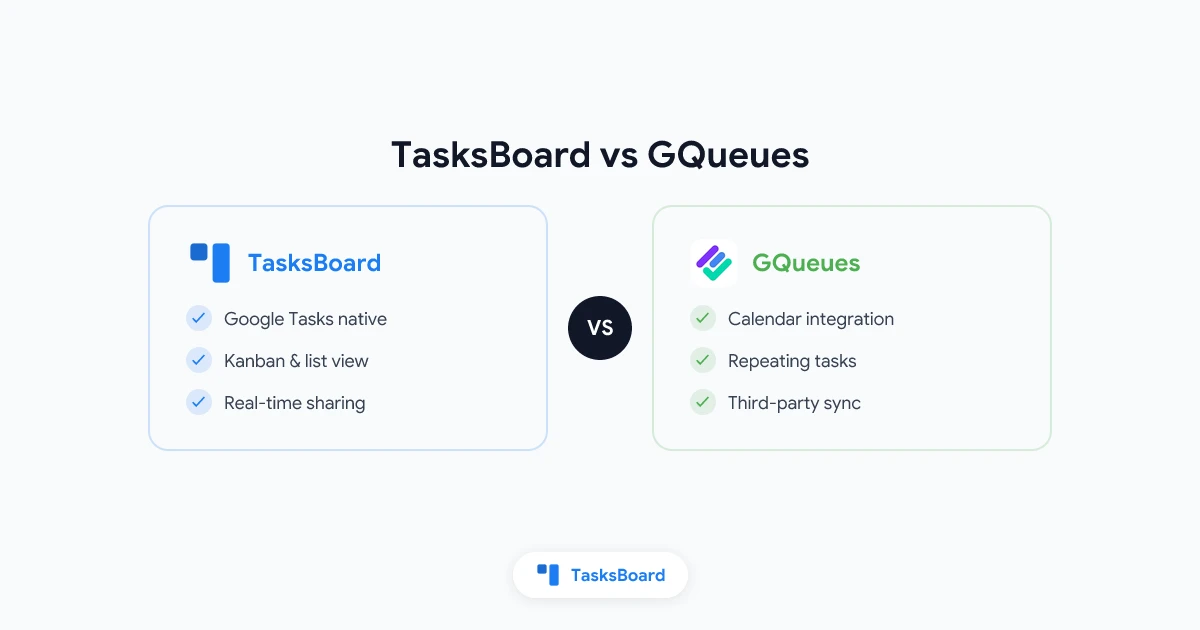
Quick summary: GQueues is a full task manager that syncs with Google Calendar and Gmail while keeping tasks in its own system. TasksBoard is a kanban layer on top of native Google Tasks, so your lists still live in Google Tasks, Gmail, and Calendar. Choose GQueues when you need deep filtering, unlimited subtask nesting, and a standalone queue model. Choose TasksBoard when you want kanban boards, shared lists, and zero migration away from Google Tasks.
TasksBoard vs GQueues at a Glance
| Dimension | TasksBoard | GQueues |
|---|---|---|
| Core model | UI layer over Google Tasks | Standalone task app + Google sync |
| Where tasks live | Google Tasks (Gmail, Calendar, mobile) | GQueues account (synced to Calendar) |
| Primary view | Full-screen kanban board | Lists / queues (board-style workflows possible) |
| Free tier | Yes: kanban + up to 5 shared lists | GQueues Lite: basic task features |
| Paid (individual) | Pro from ~$3.99/mo (annual) | GQueues for YOU: $3/mo (annual) |
| Paid (teams) | Team from ~$4.99/user/mo (annual) | GQueues for BUSINESS: $4/user/mo (annual) |
| Kanban | Native, free on Personal | List-based, not Google Tasks kanban |
| Subtasks | One level in Google Tasks. Labels and boards add structure. | Unlimited nested subtasks |
| Smart filters / search | Labels + board organization | Smart Queues, search, saved filters (paid) |
| Multiple calendar sync | Via Google Tasks ↔ Calendar | Multiple dedicated calendars (paid) |
| Gmail → task | Via Google Tasks | Built-in GQueues Gmail integration |
| Team sharing | Shared boards & lists (Google accounts) | Shared queues, assignments, teams (Business) |
| Switching cost | Low if you already use Google Tasks | Export/backup available. Tasks do not live in Google Tasks natively. |
How Each Tool Works (and Why It Matters)
GQueues: A Dedicated Queue System for Google Power Users
GQueues has been around since 2009 and is built for people who want more than Google Tasks offers without leaving the Google ecosystem. You sign in with Google, but your tasks primarily live inside GQueues. The app syncs two-way with Google Calendar, integrates with Gmail (turn emails into tasks), and adds features Google Tasks lacks: tags, Smart Queues (saved filters), unlimited subtask nesting, snooze, bulk actions, and team workspaces on the Business plan.
GQueues is a strong fit when your workflow depends on filtered views across many lists, assignments with activity history, or multiple project calendars you toggle on and off in Google Calendar.
TasksBoard: Kanban for the Google Tasks you already have
TasksBoard does not replace Google Tasks. It opens your existing Google Tasks data in a full-screen kanban board: drag cards between columns, share lists with teammates, add labels, attach Drive files, and export to Sheets. Anything you create or move in TasksBoard syncs back to Google Tasks, so tasks still appear in Gmail, Google Calendar, and the official Google Tasks mobile app.
That architecture matters for teams that standardized on Google Tasks (or want to) and only need a better surface for planning, not a second database of work.
Feature Comparison by Category
Kanban and visual workflow
TasksBoard is kanban-first. Columns map to how teams actually run work: To Do, In Progress, Done, or any custom layout. Drag-and-drop is the default interaction, not an add-on.
GQueues organizes work in queues and lists. You can run stage-based workflows, but the product is list- and filter-centric rather than a dedicated multi-column board on top of Google Tasks. If you specifically want Google Tasks data in a kanban view, TasksBoard is the direct answer. GQueues competes as a separate task manager.
Bottom line: Need kanban on real Google Tasks → TasksBoard. Need advanced list logic and filters in a standalone app → GQueues.
Subtasks, tags, and organization
GQueues wins on depth: unlimited nested subtasks, tags across the account, Smart Queues, and account-wide search on paid plans. That helps complex projects with many moving parts.
TasksBoard adds custom labels, subtasks within Google Tasks limits, multiple boards, and list-level organization. That is enough for most team boards without relearning a new task model. Organization stays visible in Google’s apps, which matters if executives or clients only look at Calendar or Gmail.
Bottom line: Deep hierarchy and power-user filtering → GQueues. Kanban + labels on native Google Tasks → TasksBoard.
Collaboration and sharing
Both tools support team workflows on paid tiers.
GQueues for BUSINESS ($4/user/mo, annual) includes shared queues, assignments, comments, activity history, teams with dedicated workspaces, and central license management for Google Workspace admins.
TasksBoard Team (~$4.99/user/mo, annual) adds unlimited shared lists, shared boards, team billing, and priority support. Collaborators use their Google accounts. You are sharing Google Tasks lists, not inviting people into a separate product silo.
Bottom line: Choose GQueues for assignment-heavy PM inside GQueues. Choose TasksBoard when collaborators must see the same tasks in Google Tasks and TasksBoard interchangeably.
Google Calendar and Gmail integration
GQueues offers two-way Calendar sync and, on paid plans, multiple calendars tied to projects. This is useful when you want calendar layers per team or client.
TasksBoard inherits Google Tasks’ Calendar behavior: due dates on tasks show on Calendar automatically. You gain a planning UI, not a separate calendar philosophy.
Gmail: GQueues can create tasks from email inside its system. TasksBoard users typically add tasks via Google Tasks (drag email to Tasks in Gmail) and manage them on the board, staying inside Google’s native pattern.
Bottom line: Multi-calendar power users often prefer GQueues. Teams that live in Gmail + Tasks sidebar → TasksBoard.
Mobile and desktop
Both offer iOS and Android apps and work in the browser.
TasksBoard also ships a desktop experience and Chrome extension for quick capture, aimed at people who keep dozens of tabs open and want Tasks one click away.
GQueues mobile apps manage the GQueues account. They do not turn the official Google Tasks app into a kanban board.
Bottom line: If mobile must remain the stock Google Tasks app with synced data, TasksBoard aligns with that. If mobile should match GQueues’ feature set, use GQueues’ apps.
Pricing Comparison (2026)
| Plan | TasksBoard | GQueues |
|---|---|---|
| Free | Personal: full kanban, sync, up to 5 shared lists | Lite: core tasks, Google login |
| Individual paid | Pro ~$3.99/mo (billed annually) | YOU: $3/mo (annual) |
| Team paid | Team ~$4.99/user/mo (annual) | BUSINESS: $4/user/mo (annual) |
Example: 10-person team (annual):
- GQueues BUSINESS: about $40/month ($4 × 10)
- TasksBoard Team: about $49.90/month ($4.99 × 10)
Prices are close. The decision should be driven by architecture (Google Tasks native vs GQueues datastore), not a few dollars per seat.
GQueues offers volume discounts at 5+ licenses. TasksBoard Team includes shared boards and team billing. Check each site’s pricing page before purchasing, as offers and trials change.
Who Should Choose GQueues
GQueues is the better fit if you:
- Need unlimited nested subtasks and complex project trees
- Rely on Smart Queues, saved searches, and snooze
- Want multiple Google Calendars synced for different projects
- Prefer email-to-task and bulk edits inside one dedicated app
- Are fine with tasks living primarily in GQueues, not in the Gmail Tasks panel
GQueues is a strong fit when Google Tasks alone is too limited and your team is willing to run day-to-day work in GQueues instead of the Gmail Tasks panel.
Who Should Choose TasksBoard
TasksBoard is the better fit if you:
- Want to keep using Google Tasks as the system of record
- Need a kanban board without migrating to Trello, Asana, or a new task database
- Share work with people who only check Gmail, Calendar, or Google Tasks on their phone
- Already have lists in Google Tasks and want a full-screen, team-friendly UI on top
- Value low switching cost: sign in with Google and your lists appear on the board
TasksBoard is not trying to out-feature every PM platform. It makes Google Tasks usable for real team work.
Switching from GQueues to TasksBoard
There is no one-click “import GQueues into Google Tasks.” GQueues provides export and backup of your account, but Google Tasks does not ingest that format automatically. A practical migration looks like this:
- Export your GQueues data (backup from account settings).
- Prioritize active projects: migrate open work first, archive the rest.
- Recreate top-level lists as Google Tasks lists (or map one GQueues queue → one Google list).
- Open TasksBoard, sign in with the same Google account, and arrange lists on a shared board.
- Invite teammates using TasksBoard’s sharing flow so everyone sees the same Google Tasks data.
For large accounts, migrate one team or client at a time rather than everything at once. Many teams run GQueues and TasksBoard in parallel briefly while validating the new board layout.
Switching from TasksBoard to GQueues: Use GQueues’ import/backup tools and accept that tasks will live in GQueues going forward. Calendar sync will follow GQueues rules, not the Google Tasks sidebar.
TasksBoard vs GQueues vs “Just Use Google Tasks”
Google’s own Tasks app is free and fine for personal lists. Both products exist because teams hit the same walls: no kanban, weak sharing, and limited organization.
| Need | Best option |
|---|---|
| Solo, simple lists | Google Tasks |
| Kanban + share lists, stay in Google Tasks | TasksBoard |
| Filters, deep subtasks, standalone PM in Google ecosystem | GQueues |
| Full PM with dependencies and portfolios | Asana, ClickUp, etc. |
Related reading on TasksBoard: How to share Google Tasks, Google Tasks kanban, Trello vs Asana (if you are comparing beyond the Google-native niche).
On qualtir.com: Google Tasks vs Todoist covers a different decision (ecosystem vs cross-platform todo app).
GQueues alternative for Google Tasks teams
If you searched for a GQueues alternative, you are usually trying to keep Google Workspace integration while changing how work feels day to day. TasksBoard is built for that path: same Google account, same task lists in Gmail and Calendar, plus kanban boards and shared lists. You give up GQueues-only features (Smart Queues, deep subtask trees, multi-calendar project views) in exchange for not maintaining a second task system.
What teams say about TasksBoard
“Having the ability to share a google tasks list has been priceless and really helped me to streamline the jobs I have coming in. Would highly recommend the app if you are working between two or more google accounts.” Stirling Moss, Chrome Web Store review
Teams switching from GQueues often care most about shared lists and a visible board. TasksBoard addresses both without asking collaborators to learn a new app.
FAQ
Is TasksBoard a GQueues alternative?
Yes. Teams searching for a GQueues alternative that keeps data in Google Tasks often land on TasksBoard. You trade GQueues-specific features (Smart Queues, unlimited nesting) for native Google Tasks sync and kanban.
Does TasksBoard replace GQueues entirely?
Only if your must-have features exist in Google Tasks + TasksBoard. If you depend on GQueues Smart Queues or multi-calendar project views, stay on GQueues or test both side by side.
Which is cheaper for a small team?
Entry team pricing is similar (~$4/user/month annually). Compare current plans on tasksboard.com/pricing and gqueues.com/pricing.
Can I use TasksBoard with a personal @gmail.com account?
Yes. TasksBoard works with personal Gmail and Google Workspace accounts.
Do tasks sync between TasksBoard and the Google Tasks mobile app?
Yes. TasksBoard reads and writes Google Tasks. Edits on your phone in the Google Tasks app appear on your board, typically in near real time (usually under a second when you are online).
Which tool is better for Google Workspace admins?
GQueues offers domain installation and central license management. TasksBoard installs from the Google Workspace Marketplace and fits teams that want Tasks to remain the underlying store.
The Bottom Line
GQueues is a mature, capable task manager for Google-centric teams that want features Google Tasks will never ship in one app.
TasksBoard is for teams that chose (or should choose) Google Tasks as the source of truth and need kanban, sharing, and a full-screen workspace without maintaining a parallel task database.
If you are evaluating TasksBoard vs GQueues, ask one question: Should our tasks live in Google Tasks or in a separate queue system? Your answer picks the product.
Ready to try kanban on Google Tasks? Start free on TasksBoard. No credit card required on the Personal plan. Open your lists, share a board with a teammate, and see your existing Google Tasks in columns within minutes.
Ready to share your Google Tasks?
Get started with TasksBoard for free, no credit card required.
Sign in