Personal Kanban Board: A Simple System to Organize Your Own Tasks

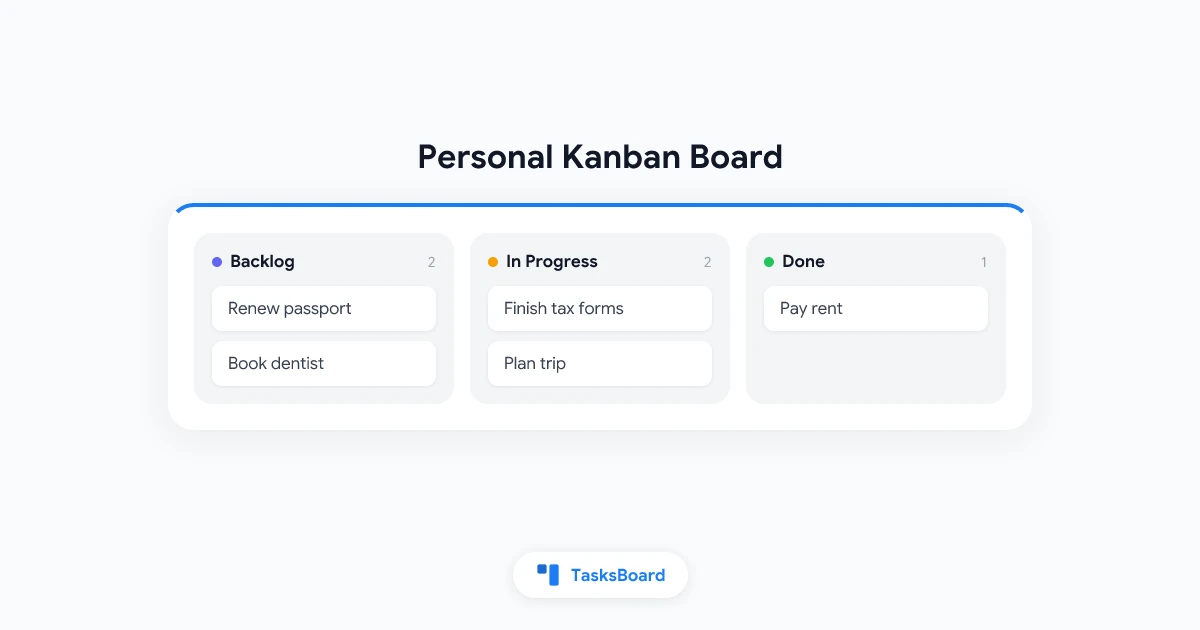
Most to-do lists fail for the same reason. They grow longer every day, and nothing on them shows you what actually matters right now. A personal kanban board fixes that by turning your task list into a visual map of what you have captured, what you are working on, and what is finished.
This is not a team tool scaled down. Personal kanban is a system built specifically for one person managing their own work, whether that is a job, a household, a side project, or all three at once.
Below, you will learn what a personal kanban board is, how it differs from a plain to-do list, and how to build one in a few minutes using TasksBoard.
What Is a Personal Kanban Board?
A personal kanban board is a visual system for managing individual tasks using columns and cards instead of a flat list. It applies the same core ideas as team kanban boards, just scaled down for one person’s workload.
The method was popularized by Jim Benson and Tonianne DeMaria Barry, who distilled it into two rules:
- Visualize your work. Every task becomes a card you can see, instead of a line buried in a list.
- Limit your work in progress (WIP). You cap how many tasks you allow yourself to work on at once, so you finish things instead of starting everything.
That second rule is what separates a personal kanban board from an ordinary to-do list. A list lets you pile on tasks with no ceiling. A kanban board forces you to make a choice: finish something, or admit you are overcommitted.
Visualize your work so nothing hides in your head, and limit how much you allow into progress at once. Together, these two habits are what make a kanban board more effective than a plain checklist for staying focused day to day.
Personal Kanban vs a Regular To-Do List
A to-do list and a personal kanban board hold the same information, tasks you need to do, but they present it very differently.
| To-Do List | Personal Kanban Board | |
|---|---|---|
| Format | Flat vertical list | Columns and cards |
| Shows status | Checked or unchecked only | Backlog, in progress, done, and any stage you define |
| Work limits | None | WIP limits per column |
| Visual overview | Requires reading every line | Visible at a glance |
| Best for | Short, simple lists | Ongoing, multi-stage work |
A to-do list works fine for a short grocery run. It struggles the moment you have overlapping projects, deadlines, and tasks sitting at different stages of progress. That is exactly the situation a kanban board for personal use is built to handle.
If you already rely on Google Tasks, you can get a board view without leaving that ecosystem. The Google Tasks kanban board guide walks through connecting your existing lists to a visual board.
How to Build Your Own Personal Kanban Board
You do not need special software or a complicated setup to start. Here is the process from scratch.
- Pick your columns. Start simple: Backlog, In Progress, Done. Add more only if your work genuinely needs them.
- Capture everything. Move every task you are holding in your head, notes app, or scattered lists into the Backlog column.
- Set a WIP limit for In Progress. Cap it at 2-3 cards. This is the step most people skip, and it is the one that matters most.
- Pull tasks forward. When you finish a card in In Progress, move it to Done, then pull the next card from Backlog.
- Review the board daily. Spend two minutes each morning scanning the columns and adjusting priorities.
A kanban board app for personal use makes this far easier than sticky notes on a wall, mainly because your cards can carry due dates, notes, and subtasks without cluttering the view.
 Try TasksBoard
Build a personal kanban board on top of your existing Google Tasks in minutes. Drag, drop, and track your own work without a new app to learn.
Get Started →Setting Work-in-Progress Limits for Personal Tasks
WIP limits feel restrictive at first, but they solve a very common problem: starting ten things and finishing none of them.
A practical starting point for an individual is a limit of 2 to 3 cards in your “In Progress” column at any time. If you find yourself constantly at the limit and frustrated, that is useful information. It usually means your Backlog is realistic and your capacity is the real constraint, not your planning.
If tasks sit in “In Progress” for days without moving, the limit is doing its job by surfacing a bottleneck early rather than letting it hide in a long list.
Personal Kanban Board Examples for Different Use Cases
The same three-column structure adapts to almost any personal workload. A few common examples:
- Job search. Columns for Researching, Applied, Interviewing, and Offer, so you always know where each application stands.
- Freelance work. Columns for Leads, In Progress, Client Review, and Invoiced, giving you a clear view of what still needs to be billed.
- Household management. Columns for This Week, Doing, and Done, covering everything from repairs to errands.
- Studying. Columns for To Review, Studying, and Mastered, useful alongside a broader study planner setup.
- Side projects. Columns for Ideas, Building, and Shipped, so unfinished projects stop quietly piling up.
Because a personal kanban board for personal use is just a structure, you can rename the columns freely to match whatever you are actually managing.
Common Mistakes to Avoid
A kanban board only helps if you use it consistently. Watch out for these habits:
- Skipping the WIP limit. Without it, “In Progress” just becomes a second backlog with a different name.
- Too many columns. More than four or five stages usually adds overhead without adding clarity.
- Never reviewing the board. A board you do not look at daily drifts out of date fast.
- Mixing personal and work tasks on one board with no separation. Use separate lists or clear labels so the two do not blur together.
If prioritization within columns is still a struggle, pairing your board with the Eisenhower Matrix can help you decide which Backlog card to pull next.
FAQ
Conclusion
A personal kanban board turns a growing, unreadable to-do list into something you can actually manage: a visible map of your work, with limits that keep you honest about what you can realistically finish.
Start with three columns, cap your work in progress, and review the board daily. That is the whole system, and it scales from a single side project to your entire week.
Get started with TasksBoard and build your own personal kanban board on top of the Google Tasks you already use.
Ready to share your Google Tasks?
Get started with TasksBoard for free, no credit card required.
Sign in