Eisenhower Matrix: How to Prioritize Tasks (Free Template + Google Tasks Guide)

Most task lists fail for the same reason. Everything sits at the same level of importance, so the loudest task wins instead of the one that actually matters. The Eisenhower Matrix fixes that by forcing every task through two simple questions: is it urgent, and is it important?
The framework is named after Dwight D. Eisenhower, who reportedly said, “What is important is seldom urgent, and what is urgent is seldom important.” That one line is the entire method. Once you sort tasks by urgency and importance instead of by whichever one is shouting loudest, prioritization stops being a guessing game.
This guide covers what the Eisenhower Matrix is, gives you a free template for the four quadrants, and shows how to build one using Google Tasks and TasksBoard.
Key takeaways:
- The Eisenhower Matrix sorts tasks into four quadrants based on urgency and importance, not by due date or gut feeling alone.
- Quadrant 2 (important, not urgent) is where the framework earns its keep. Most people spend their day in Quadrant 1 and Quadrant 3 instead.
- A kanban-style board maps naturally onto the four quadrants, which makes TasksBoard a practical home for the matrix.
- The matrix works for individuals and teams, though team use requires a shared view so priorities don’t live only in one person’s head.
What the Eisenhower Matrix is
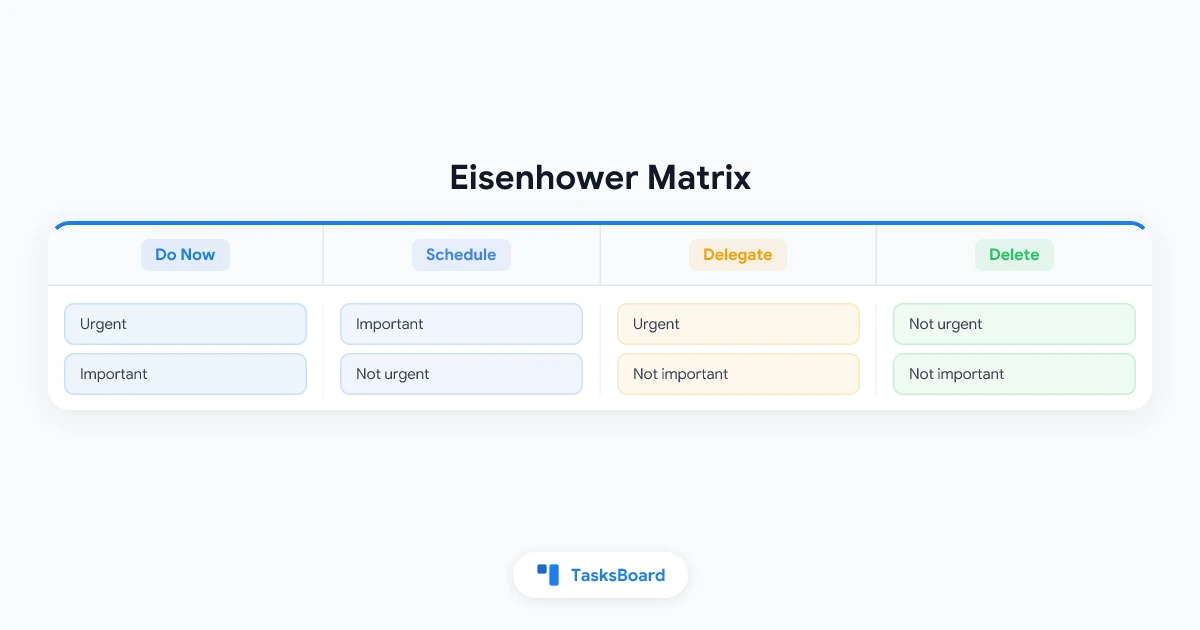
The Eisenhower Matrix, also called the urgent-important matrix, is a 2x2 grid. One axis is urgency, the other is importance. Every task lands in one of four boxes based on where it falls on both axes.
- Quadrant 1: Urgent and Important - Do these now. Crises, deadlines, and problems that will get worse if ignored.
- Quadrant 2: Important, Not Urgent - Schedule these. Planning, skill building, relationship maintenance, and the work that prevents future Quadrant 1 fires.
- Quadrant 3: Urgent, Not Important - Delegate these. Interruptions, some emails, and requests that feel pressing but do not require your specific skills.
- Quadrant 4: Not Urgent, Not Important - Delete or defer these. Busywork, mindless scrolling, and tasks that exist out of habit rather than value.
The insight is not that urgent things don’t matter. It is that treating urgency as the only sorting signal means important-but-quiet work never gets scheduled, and it eventually becomes an urgent crisis anyway.
| Q1: Do Now Urgent + Important |
Q2: Schedule Not Urgent + Important |
| Q3: Delegate Urgent + Not Important |
Q4: Delete Not Urgent + Not Important |
Why Quadrant 2 matters most
Quadrant 1 feels productive because you’re constantly finishing things. Quadrant 2 feels slow because nothing is on fire, which is exactly why people skip it.
That’s the trap. Strategic planning, learning a new skill, writing documentation, checking in with your team, and preventive maintenance all live in Quadrant 2. None of them scream for attention today. All of them reduce how often you end up back in Quadrant 1 next month.
A simple test: look at your task list from last week and count how many Quadrant 1 fires were actually preventable. A client escalation that started as an unanswered email three weeks ago. A server outage that a scheduled upgrade would have avoided. Most recurring emergencies trace back to a Quadrant 2 task that got pushed off one too many times.
The goal is not to eliminate Quadrant 1 completely. Some urgency is real and unavoidable. The goal is to protect enough time for Quadrant 2 that Quadrant 1 stops growing.
How to sort tasks into the matrix
Sorting a task list into four quadrants sounds simple until you’re staring at 40 open items. Here’s a step-by-step process that keeps it fast.
Step 1: List everything first, sort second
Don’t try to categorize while you brainstorm. Get every task out of your head and into a single list, whether that’s a notepad, a Google Tasks list, or a TasksBoard board. Sorting and capturing are different mental modes, and mixing them slows both down.
Step 2: Ask the urgency question
For each task, ask: “Does this have a real deadline in the next day or two, or consequences if delayed?” Be honest. A lot of tasks that feel urgent only feel that way because of habit or someone else’s inbox anxiety, not an actual deadline.
Step 3: Ask the importance question
Separately, ask: “Does this move a real goal forward, or protect something that matters?” Importance is not the same as size. A five-minute task can be important if it unblocks a teammate. A two-hour task can be unimportant if nothing changes whether you do it or not.
Step 4: Place the task and commit to the quadrant’s action
Once a task has a quadrant, follow the quadrant’s rule:
- Quadrant 1: Do it today. No further scheduling needed.
- Quadrant 2: Put it on the calendar for a specific day and time. Without a scheduled slot, Quadrant 2 tasks drift indefinitely.
- Quadrant 3: Hand it to someone else, or set a two-minute limit if it truly can’t be delegated.
- Quadrant 4: Remove it from the list. If you’re not sure, archive it instead of deleting, and revisit in a month.
Step 5: Re-sort weekly
Priorities shift. A Quadrant 2 task can become Quadrant 1 overnight if a deadline appears. Set aside 10 minutes each week to move tasks between quadrants rather than trusting last week’s sort to still be accurate.
 Try TasksBoard
Turn your Google Tasks into a four-column board that mirrors the Eisenhower Matrix, then drag tasks between quadrants as priorities change.
Get Started →Building an Eisenhower Matrix with Google Tasks and TasksBoard
Google Tasks on its own is a flat list, which makes it hard to see four categories at once. You can approximate the matrix with four separate task lists named “Do Now,” “Schedule,” “Delegate,” and “Delete,” but switching between lists to compare priorities gets tedious fast.
This is where a board view helps. TasksBoard turns your Google Tasks lists into a kanban board, and a kanban board is structurally close to the Eisenhower Matrix already: instead of one flat list, you get columns you can see side by side.
A practical setup:
- Create four columns in TasksBoard: Do Now, Schedule, Delegate, and Delete/Later.
- Add your existing Google Tasks to the board. They sync automatically since TasksBoard reads from your real Google Tasks account.
- Drag each task into its quadrant column based on the urgency and importance questions above.
- Add due dates to anything in the Do Now and Schedule columns so they carry through to Google Calendar.
- Review the board at the start of each day. The Do Now column is your day. The Schedule column tells you what to calendar next.
Because the board reflects your actual Google Tasks data, there’s no separate system to maintain. You’re looking at the same tasks, just organized by the matrix instead of by list name.
For more on setting up columns and boards in general, see our guide on the Google Tasks kanban board.
Eisenhower Matrix vs other prioritization methods
The Eisenhower Matrix is one of several ways to rank tasks. Here’s how it compares to two other common approaches.
Eisenhower Matrix vs simple priority labels (High/Medium/Low). A single priority label collapses two variables (urgency and importance) into one, which loses information. A task can be high-urgency and low-importance, and a single “High” label hides that distinction. The matrix forces you to consider both. If you’re using Google Tasks’ built-in priority field, our Google Tasks priority guide covers how that single-axis system works and where it falls short.
Eisenhower Matrix vs the MoSCoW method. MoSCoW (Must have, Should have, Could have, Won’t have) is popular in project scoping and works well for a single project’s feature list. The Eisenhower Matrix is better suited to daily and weekly task management across unrelated areas of work, since it doesn’t assume everything belongs to one project.
Neither method is strictly better. The Eisenhower Matrix tends to win for personal daily prioritization, while MoSCoW tends to win for scoping a specific deliverable.
Common mistakes when using the Eisenhower Matrix
Putting everything in Quadrant 1. If most of your list is “urgent and important,” the sorting isn’t doing its job. Go back through Quadrant 1 and ask which items are actually urgent versus which just feel that way because they’ve been sitting too long.
Never revisiting Quadrant 4. Deleted or deferred tasks tend to pile up unnoticed. Set a monthly reminder to skim Quadrant 4 and confirm those tasks still don’t matter, or clear them out entirely.
Skipping the delegate step. Quadrant 3 only works if delegation actually happens. If you sort a task into “Delegate” but never hand it off, it just becomes a Quadrant 1 task later, with the added cost of having sat untouched.
Treating the matrix as a one-time exercise. Sorting your tasks once and never returning to the board defeats the purpose. The matrix is a recurring habit, not a single afternoon project.
FAQ
Conclusion
The Eisenhower Matrix works because it separates two questions that most task lists blur together: what’s urgent, and what’s important. Once you sort by both instead of urgency alone, Quadrant 2 work, the planning and prevention that stops future fires, finally gets the time it needs.
Start small. Take your current task list, sort the next 10 items into the four quadrants, and notice how many of them you’ve been treating as urgent out of habit rather than necessity.
TasksBoard makes the ongoing version of this easy: a four-column board built on your real Google Tasks data, so the matrix stays current instead of becoming another list you set up once and abandon.
For more prioritization approaches, see our guide on Google Tasks priority and time blocking with Google Tasks.
Ready to share your Google Tasks?
Get started with TasksBoard for free, no credit card required.
Sign in