Best Google Tasks Alternatives in 2026 (Ranked)

Google Tasks is free and everywhere in Gmail, until you need shared lists, kanban, filters, or reminders that behave predictably. Then you start searching for a Google Tasks alternative.
This guide ranks the best replacements and extensions for 2026, with honest trade-offs. The surprise recommendation for many Google Workspace teams: do not leave Google Tasks at all: add a kanban layer instead.
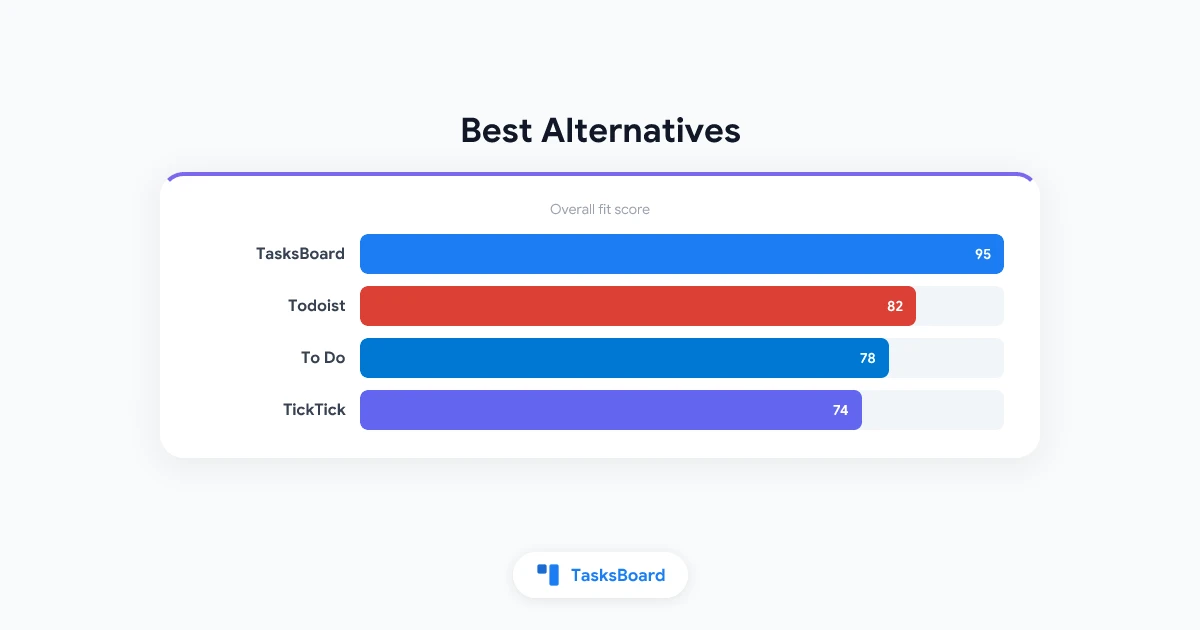
TL;DR: Todoist leads for power features. Microsoft To Do wins Outlook shops. TickTick balances features and price. TasksBoard is the best option if you want to stay on native Google Tasks with kanban and sharing. Full comparisons: vs Todoist, vs Microsoft To Do.
How We Ranked Google Tasks Alternatives
| Criteria | Weight | What we measured |
|---|---|---|
| Core features | 25% | Reminders, subtasks, filters, views |
| Google ecosystem fit | 25% | Gmail, Calendar, Drive, Workspace |
| Collaboration | 20% | Sharing, assignments, comments |
| Mobile & desktop apps | 15% | Quality, sync speed, offline |
| Value | 15% | Free tier generosity, paid pricing |
Quick Comparison Table
| Tool | Best for | Stays in Google Tasks? | Free tier | Starting paid |
|---|---|---|---|---|
| TasksBoard | Kanban + sharing on Google Tasks | Yes (native sync) | Yes | ~$3.99/mo |
| Todoist | Power users, filters, labels | No (import/export) | Limited | ~$5/mo |
| Microsoft To Do | Microsoft 365 / Outlook users | No | Yes | Included in M365 |
| TickTick | Feature-rich all-rounder | No | Yes | ~$3/mo |
| Google Tasks | Minimal capture in Gmail | Yes (baseline) | Yes | Free |
1. TasksBoard, Best for Staying in Google
Verdict: Top Google Tasks alternative if the problem is the UI, not the data model.
TasksBoard is not a replacement database. It is a full-screen kanban board on top of your existing Google Tasks lists. Create a card in TasksBoard → it appears in Gmail. Complete a task on your phone → the card moves on the board.
Why it ranks first for Google Workspace teams:
- Tasks remain in Google Tasks, Calendar, and mobile apps
- Kanban boards with drag-and-drop columns
- Shared lists without native Google sharing
- Labels, Drive attachments, Sheets export
- Works with personal Gmail and Google Workspace
Trade-offs:
- Not a standalone task app, requires Google Tasks underneath
- No location reminders or Todoist-style natural language
- Paid plans for advanced team features
Choose TasksBoard when: You like Google Tasks sync but hate the sidebar, need shared boards, or run status-based workflows (To Do → Doing → Done).
Try TasksBoard free · TasksBoard vs staying in sidebar only
2. Todoist, Best for Power Features
Verdict: The default leave Google recommendation for feature depth.
Todoist offers projects, labels, filters, priorities, karma, templates, and natural-language due dates (“every Monday at 9am”). Reminders are first-class, not delegated to another calendar app.
Strengths:
- Best-in-class quick capture and scheduling language
- Cross-platform apps with offline mode
- Team workspaces with comments and activity log
- Integrations beyond Google (Zapier, Slack, etc.)
Weaknesses vs Google Tasks:
- Tasks do not live natively in Gmail sidebar
- Another subscription for full reminders and filters
- Migration effort from Google Tasks lists
Choose Todoist when: Features matter more than living inside Gmail, and you are willing to migrate task data.
3. Microsoft To Do, Best for Microsoft 365 Shops
Verdict: The obvious alternative for Outlook-centric organizations.
Microsoft To Do integrates with Outlook, Teams, and Windows. My Day gives a daily focus view Google Tasks lacks. Sharing and assignment features exceed native Google Tasks.
Strengths:
- Free with Microsoft accounts; included in M365
- Outlook flag-to-task workflow
- Shared lists and assigned tasks (personal Microsoft accounts)
- Clean mobile and Windows apps
Weaknesses vs Google Tasks:
- Weak Gmail integration
- Google Calendar is not the notification backbone
- Dual-ecosystem friction if your company runs Workspace
Choose Microsoft To Do when: Email lives in Outlook and leadership standardized on Microsoft.
4. TickTick, Best Feature-to-Price Balance
Verdict: The all-rounder for individuals who want more than Google Tasks without Todoist pricing.
TickTick packs calendars, habits, Pomodoro, Eisenhower matrix views, and flexible reminders into one app. It feels like the feature list Google Tasks will never ship.
Strengths:
- Rich reminders (including location on mobile)
- Multiple views: list, kanban, timeline, calendar
- Affordable premium tier
- Solid Android and iOS apps
Weaknesses vs Google Tasks:
- No native Gmail sidebar integration
- Another cloud silo outside Google Workspace
- Team features lag Todoist for large orgs
Choose TickTick when: You want kanban and habits in one app and do not need Gmail-native tasks.
5. Google Tasks, Best When “Alternative” Is the Wrong Frame
Sometimes the right move is not switching, it is fixing how you use Google Tasks.
| Problem | Fix inside Google | Fix with TasksBoard |
|---|---|---|
| Missed reminders | Calendar permissions, due date + time | Same, TasksBoard uses Calendar |
| Cluttered lists | GTD list structure | Kanban columns + labels |
| No sharing | N/A in native Tasks | Shared boards |
| Sidebar too small | Pin tasks.google.com | Full-screen kanban |
Read how to use Google Tasks effectively before migrating away. Read our Google Tasks review for an honest capability scorecard.
Alternatives by Use Case
| Your situation | Recommended path |
|---|---|
| Google Workspace team, need kanban | TasksBoard |
| Solo power user, leave Google | Todoist |
| Outlook company | Microsoft To Do |
| Budget feature hoarder | TickTick |
| Apple-only household reminders | Apple Reminders |
| Quick notes, not project tasks | Google Keep |
| Notifications broken, not app limited | Fix notifications |
Migration vs Extension: The Decision Tree
Need native Google Tasks in Gmail/Calendar?
├── Yes → Can you fix it with better habits only?
│   ├── Yes → Google Tasks + effective list system
│   └── No → Add TasksBoard (kanban + sharing)
└── No → Pick standalone app
    ├── Microsoft shop → Microsoft To Do
    ├── Most features → Todoist
    └── Value + views → TickTick
Migration cost matters. Exporting Google Tasks to Todoist or TickTick is doable but lossy (subtasks, notes formatting, recurring items). TasksBoard has zero migration: it reads your existing lists on connect.
What About GQueues, Asana, Notion?
GQueues: Mature Google-adjacent queue manager; tasks live outside Google Tasks. Compare in our TasksBoard vs GQueues article if you want a standalone queue system.
Asana / Monday / ClickUp: Real project management, not task-list alternatives. Overkill for personal to-dos; right when you need dependencies, portfolios, and reporting.
Notion: Flexible databases, weak reminders, poor mobile capture compared to dedicated task apps.
Pricing Snapshot (2026)
Prices change, verify on each vendor’s site before buying. Directionally:
| Tool | Free tier highlights | Paid entry (individual) |
|---|---|---|
| Google Tasks | Full app, no paywall | , |
| TasksBoard | Kanban + limited sharing | ~$3.99/mo (annual) |
| Todoist | Basic lists, limited reminders | ~$5/mo |
| Microsoft To Do | Full app for Microsoft accounts | Often bundled in M365 |
| TickTick | Most views, some limits | ~$2.79–3.99/mo |
Google Tasks plus TasksBoard often beats a Todoist Business rollout for small Google Workspace teams because you are paying for a view layer, not retraining 15 people on a new capture habit and migrating historical lists.
Stay-in-Google Positioning: Why TasksBoard Is Different
Most Google Tasks alternative lists assume you must leave Google. That made sense when sharing and kanban were impossible. In 2026, TasksBoard gives:
- Same data store: Google Tasks remains source of truth
- Better surface: full-screen board, not a 280px sidebar
- Team sharing: link-based collaboration with sync
- No IT battle: installs from Google Workspace Marketplace
You are not choosing between Google and productivity. You are choosing between Google’s minimal UI and a professional board on the same API.
FAQ
What is the best Google Tasks alternative in 2026?
For Google Workspace users who want to keep Gmail sync: TasksBoard. For maximum features outside Google: Todoist.
Is there a free Google Tasks alternative?
Microsoft To Do, TickTick, and TasksBoard all have free tiers. Google Tasks itself is fully free.
Can I use Todoist and Google Tasks together?
Yes, but maintaining two systems creates drift. Most people pick one primary capture app.
Does TasksBoard replace Google Tasks?
No. It extends Google Tasks with kanban, sharing, and labels. Tasks still sync to Gmail and Calendar.
How do I share tasks if I stay on Google Tasks?
Use TasksBoard shared lists. Native Google Tasks still cannot share lists.
Is Microsoft To Do better than Google Tasks?
Better for Outlook users and My Day focus. Worse for Gmail-native workflows. See Google Tasks vs Microsoft To Do.
Should I switch or add TasksBoard?
If your pain is visibility, sharing, or kanban, add TasksBoard. If your pain is reminders, filters, and location alerts, consider Todoist or TickTick.
The Bottom Line
The best Google Tasks alternative depends on whether you want to leave Google’s data model. Todoist, Microsoft To Do, and TickTick are strong standalone apps. TasksBoard is the ranked choice for teams that should stay on Google Tasks but need kanban, sharing, and a full-screen workspace, without a migration project.
Stay on Google Tasks. Upgrade the view. Open TasksBoard free and turn your existing lists into kanban boards in minutes.
Ready to share your Google Tasks?
Get started with TasksBoard for free, no credit card required.
Sign in