Best Trello Alternatives in 2026: Free Options for Google Tasks Users

Trello introduced millions of people to kanban-style task management. For a long time it was the default recommendation for anyone who wanted a visual board without complexity. But in 2026, teams are increasingly running into Trello’s limits.
Whether you have outgrown the free tier, need tighter Google Workspace integration, or find that cards and boards are not the right fit, there are strong alternatives worth considering.
Why People Look for Trello Alternatives
Trello’s core value proposition, drag-and-drop kanban boards with minimal setup, remains solid. Users typically look for alternatives when they hit one of these friction points:
- Free tier limitations: 10-board cap and restricted Power-Ups push teams to a paywall quickly
- No native Google integration: the Google Workspace Power-Up is not seamless and tasks live in a separate system
- Limited reporting: no workload visibility or velocity tracking without third-party tools
- Collaboration at scale: managing dependencies across multiple projects requires more structure than Trello provides
- UI clutter: as the workspace grows, dozens of boards and stickers become hard to navigate
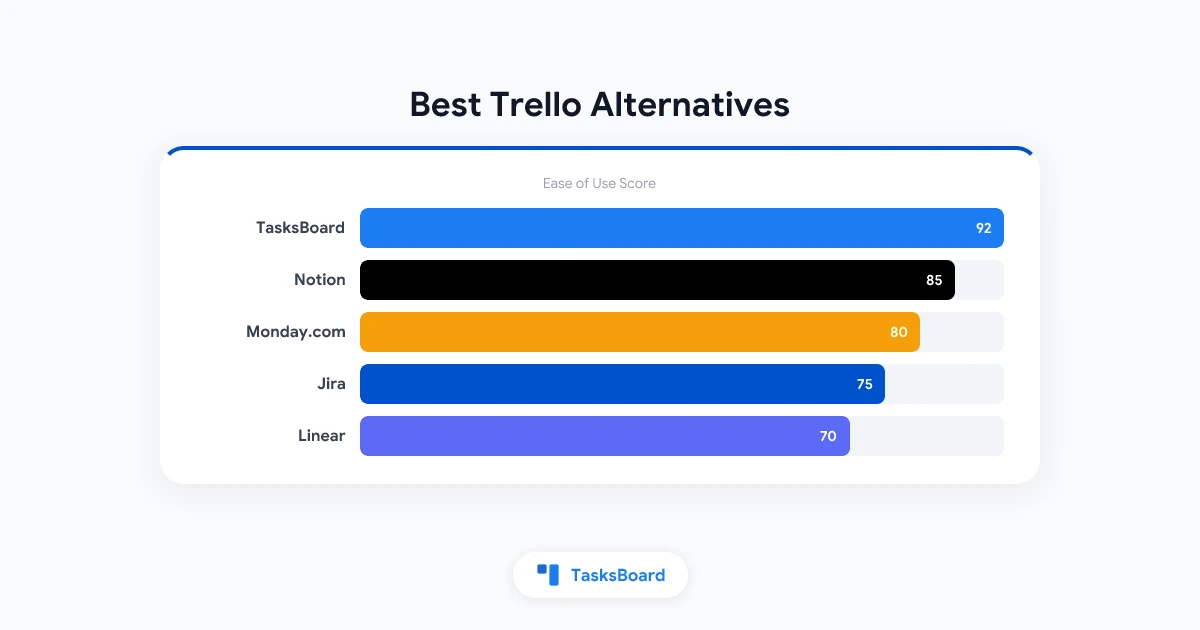
Best Trello Alternatives in 2026
1. TasksBoard: Best for Google Workspace Teams
TasksBoard is a kanban board built directly on Google Tasks. If your team already uses Gmail, Google Calendar, and Google Tasks, it is the most frictionless Trello alternative available.
Kanban board for Google Tasks — share boards with your team, sync due dates to Google Calendar, and manage tasks without leaving your existing Google Workspace.
Get Started →What it does differently from Trello:
- Works with Google Tasks: tasks are not duplicated across systems
- Shared task lists with team members via Google accounts
- Integrates natively with Google Calendar (due dates appear on calendar)
- Full-screen board view that stays fast regardless of list size
Best for: Teams using Google Workspace who want kanban without leaving their existing tools.
Price: Free tier covers most needs. Premium unlocks advanced features.
Limitation: Automations are not as extensive as Trello’s Power-Ups.
2. Asana: Best for Growing Teams
Asana is a full-featured project management tool with multiple views: list, board, timeline, and calendar. It is significantly more powerful than Trello for teams managing complex, multi-phase projects.
What it does differently from Trello:
- Multiple views for the same project (board, list, timeline)
- Task dependencies: block tasks until prerequisites are done
- Portfolio view for tracking multiple projects simultaneously
- Robust reporting and workload management
Best for: Teams that have outgrown Trello and need project management with dependencies and reporting.
Price: Free for up to 10 users. $10.99/user/month for Premium.
3. Notion: Best for Teams That Combine Docs and Tasks
Notion combines a document editor, database, and project management tool in one platform. It is extremely flexible but requires more setup than Trello.
What it does differently from Trello:
- Tasks can live inside documents (meeting notes link directly to action items)
- Database views: table, board, calendar, gallery, timeline
- Team wiki, templates, and knowledge management built in
Best for: Teams that want to manage both knowledge (docs, wikis) and tasks in one tool.
Price: Free for individuals. $8/user/month for Teams.
4. ClickUp: Best for Power Users
ClickUp positions itself as a replacement for all other productivity tools. It has more features than almost any competitor: custom views, automation, time tracking, goals, and docs all in one place.
What it does differently from Trello:
- 15+ view types including Gantt, calendar, and workload
- Native time tracking and automations without a Power-Up tier
- Goals and OKR tracking
Best for: Teams willing to invest setup time in exchange for a comprehensive platform.
Price: Free with limits. $7/user/month for Unlimited.
5. Linear: Best for Engineering Teams
Linear is purpose-built for software development teams. It is fast, opinionated, and integrates deeply with GitHub and developer tools. Related: Best Agile Tools in 2026.
What it does differently from Trello:
- Optimized for sprint-based development cycles
- Native GitHub integration (auto-close issues on merge)
- Extremely fast keyboard-driven UI
- Roadmap and cycle management
Best for: Engineering teams running sprints who want a tool that matches their workflow.
Price: Free for up to 250 issues. $8/user/month for Standard.
6. Monday.com: Best for Business Teams
Monday.com is a work operating system with a highly visual interface. It is popular in marketing, operations, and sales teams for its combination of board views, dashboards, and automations.
What it does differently from Trello:
- Customizable column types (status, person, date, formula)
- Dashboard widgets that pull data across multiple boards
- Automations for status changes, notifications, and integrations
Best for: Business teams in marketing or client services who need dashboard reporting.
Price: From $9/user/month. There is no permanently free tier for teams.
Feature Comparison: Trello Alternatives
How to Choose the Right Trello Alternative
The right replacement depends on what specifically you are trying to solve with a Trello move.
How to Migrate from Trello
Before switching, consider the migration overhead carefully. A poorly planned migration creates more disruption than the problems you were trying to solve.
Frequently Asked Questions
What is the best free Trello alternative?
For Google Workspace teams: TasksBoard. For general use: Asana or ClickUp both have strong free tiers. TasksBoard is specifically valuable if you already have tasks in Google Tasks and want zero migration overhead.
Is Notion better than Trello?
For teams that need to combine documentation and task management, yes. For teams that want a simple visual kanban board with minimal setup, Trello (or TasksBoard) is faster to start. Notion’s flexibility comes with setup overhead.
Can I use Google Tasks instead of Trello?
Yes, though Google Tasks does not have a native board view. TasksBoard adds the kanban board interface to Google Tasks, making it a viable Trello replacement for Google Workspace users. Read our guide to sharing Google Tasks for collaboration setup.
What is the easiest Trello alternative to set up?
TasksBoard for Google users: if you already have Google Tasks, setup takes minutes. For non-Google users, ClickUp and Asana have the most streamlined onboarding of the remaining options.
Is ClickUp really a good Trello alternative?
For teams that want more features, yes. ClickUp has significantly more capability than Trello: automations, time tracking, 15+ views. The tradeoff is a steeper learning curve. Many users find it overwhelming at first but powerful once they settle in.
Does Asana have a kanban view?
Yes. Asana’s board view is comparable to Trello’s. Asana also offers list, timeline, and calendar views for the same project, which is a significant advantage over Trello.
Conclusion
If your team uses Google Workspace, TasksBoard is the most seamless path from Trello. Your tasks stay in Google Tasks, your deadlines appear in Google Calendar, and you get the visual kanban experience Trello popularized, all without switching platforms.
Start with your most important active project. Move it to a Google Tasks list, open TasksBoard, and see how the board view compares to your current Trello setup. Most teams find the integration benefit more valuable than any individual feature difference.
Ready to share your Google Tasks?
Get started with TasksBoard for free, no credit card required.
Sign in